
A modern, dark-mode-first MongoDB GUI. Built as a daily-driver alternative to MongoDB Compass, focused on speed, density, and a polished editing experience.


- Multiple connections, side-by-side. Connect to as many clusters as you want; each runs an independent pool. Drag-reorder them in the sidebar, manage them with right-click context menus.
- Built-in SSH tunnelling. Point a connection at a cluster that is only reachable from a jump host — key, password or agent auth, no external port forwards. Because the tunnel is a dynamic SOCKS5 proxy rather than a single forwarded port, the driver reaches every replica-set member it discovers, resolved on the SSH server's side.
- Cloudflare Access tunnels. For a MongoDB published through Cloudflare Access, MongoBench runs
cloudflared access tcpitself on a free loopback port and connects through it — sign in with your browser or a service token, no local port to pick or forward. - Several tabs per collection, with drafts. Open the same collection as often as you like. Each tab switches between Simple (filter / projection / sort), Aggregation pipeline and Shell (mongosh syntax for reads like
db.coll.find().limit()and writes likeupdateMany); edits stay drafts until you run them, and every mode keeps its own last result. - Schema-aware completion. Suggestions come from a sample of the collection: field paths with their types and common values, operators that fit the field, pipeline stages that know which fields the previous stages produce, and shell methods.
- Mongo shell syntax everywhere. Type
ObjectId("…"),ISODate("…"),UUID("…"),NumberLong("…")etc. directly in filters and editors — MongoBench parses it into canonical EJSON before sending. - Numeric types stay exact. Int32, Int64, Double and Decimal128 values keep their BSON type through view, edit and save —
5.0stays a double,NumberLong("5")stays a long,NaNand-0.0survive. - Optimistic concurrency on document edits. Every edit and delete of a single document includes a sha-256 hash precondition of the document; concurrent edits surface as conflicts instead of silently overwriting.
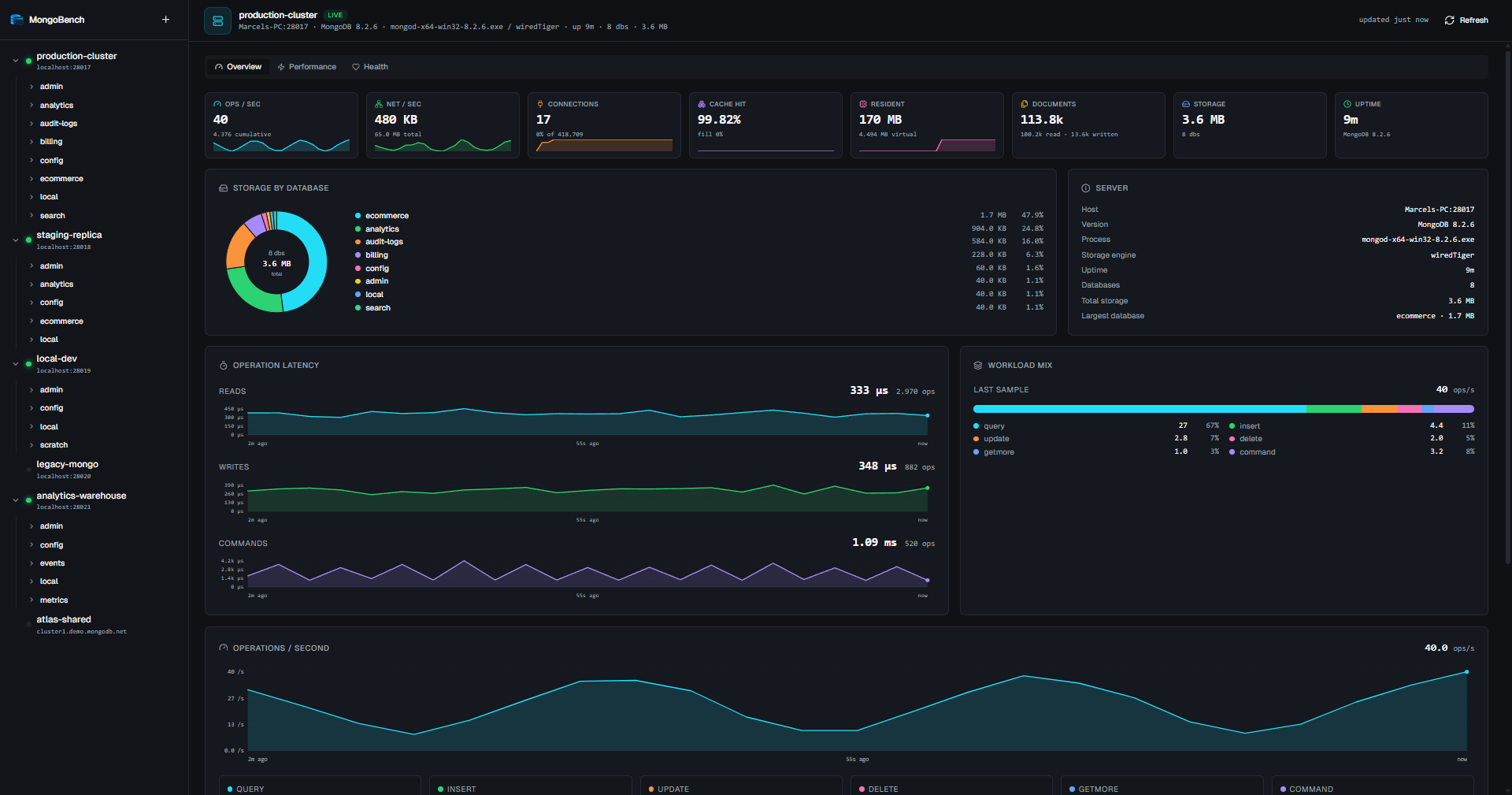
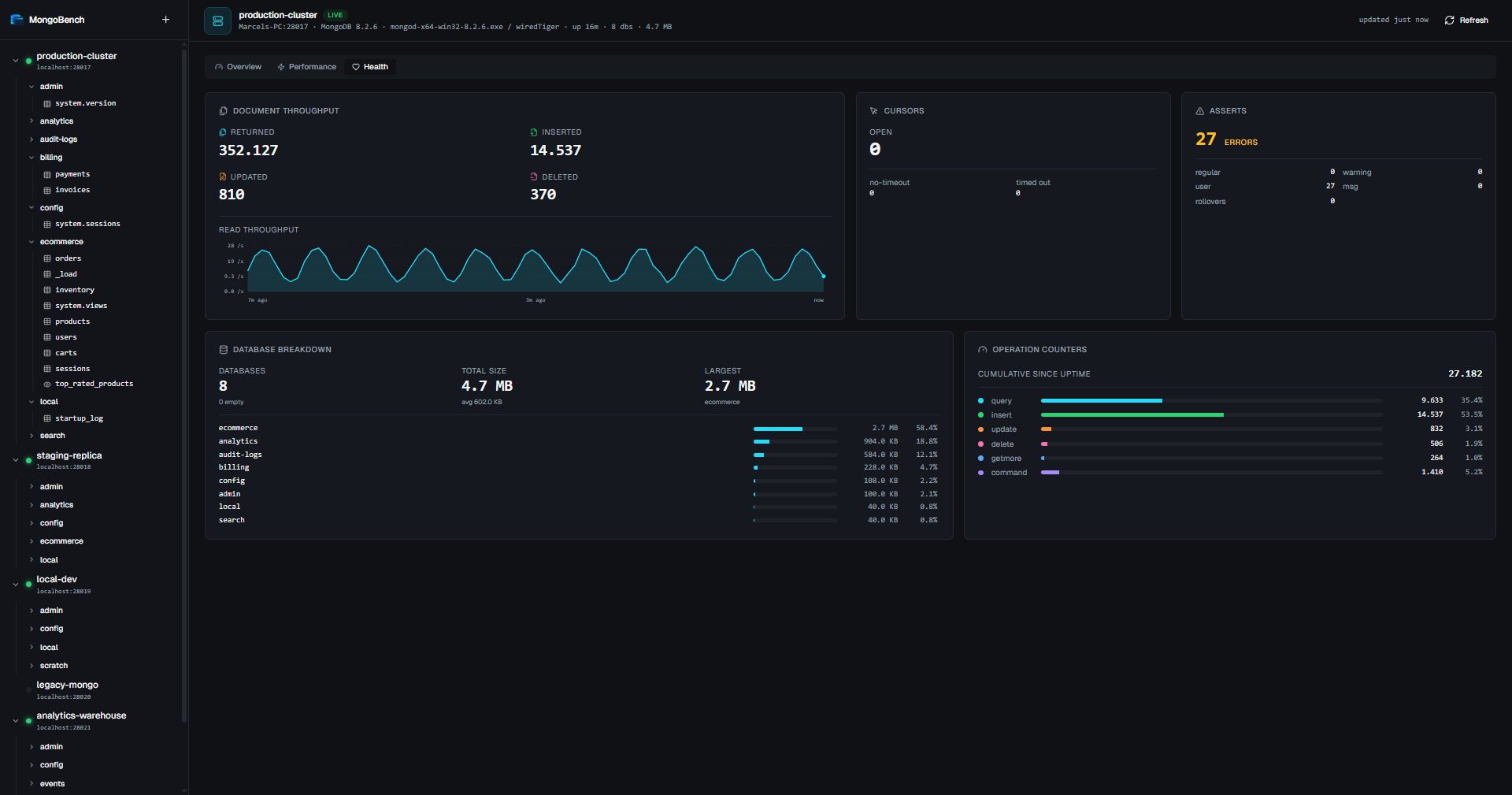
- Built-in observability. Per-connection dashboard with op rate, read/write/command latency, connection pool state, cache fill, network throughput, and a per-database storage breakdown.
- Updates you decide on. MongoBench tells you when a newer release exists and shows the download progress, but nothing is fetched or installed until you click. Builds are unsigned — the app never replaces its own binary behind your back.
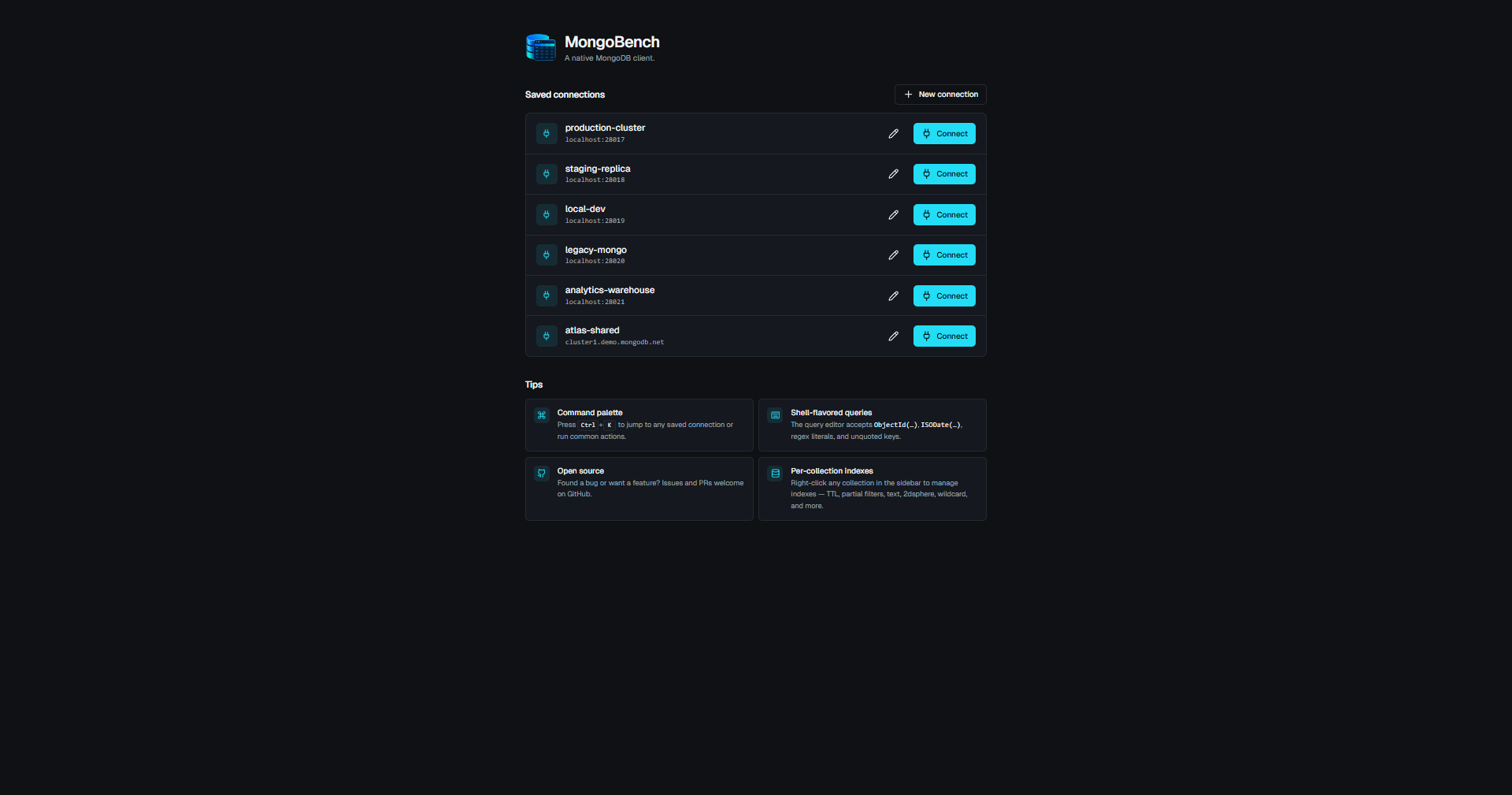
Saved connections at a glance with quick-connect buttons and inline tips.
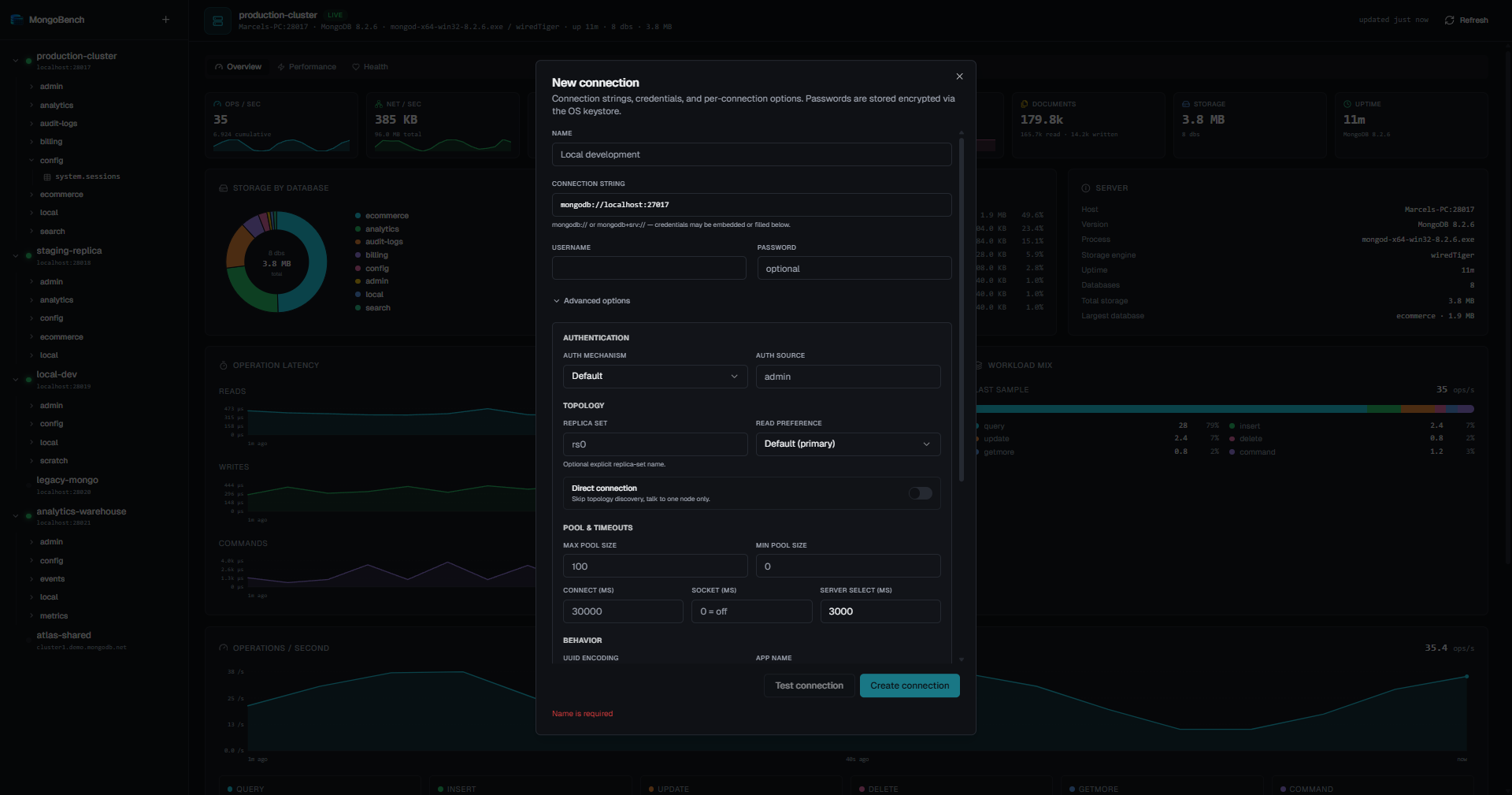
Full driver-option surface — auth, SSH or Cloudflare Access tunnel, topology, pool, timeouts, UUID encoding, display timezone.
Live per-connection stats. The hero shot above is the Overview tab; the Health tab focuses on document throughput, cursors, asserts, and a per-database breakdown.
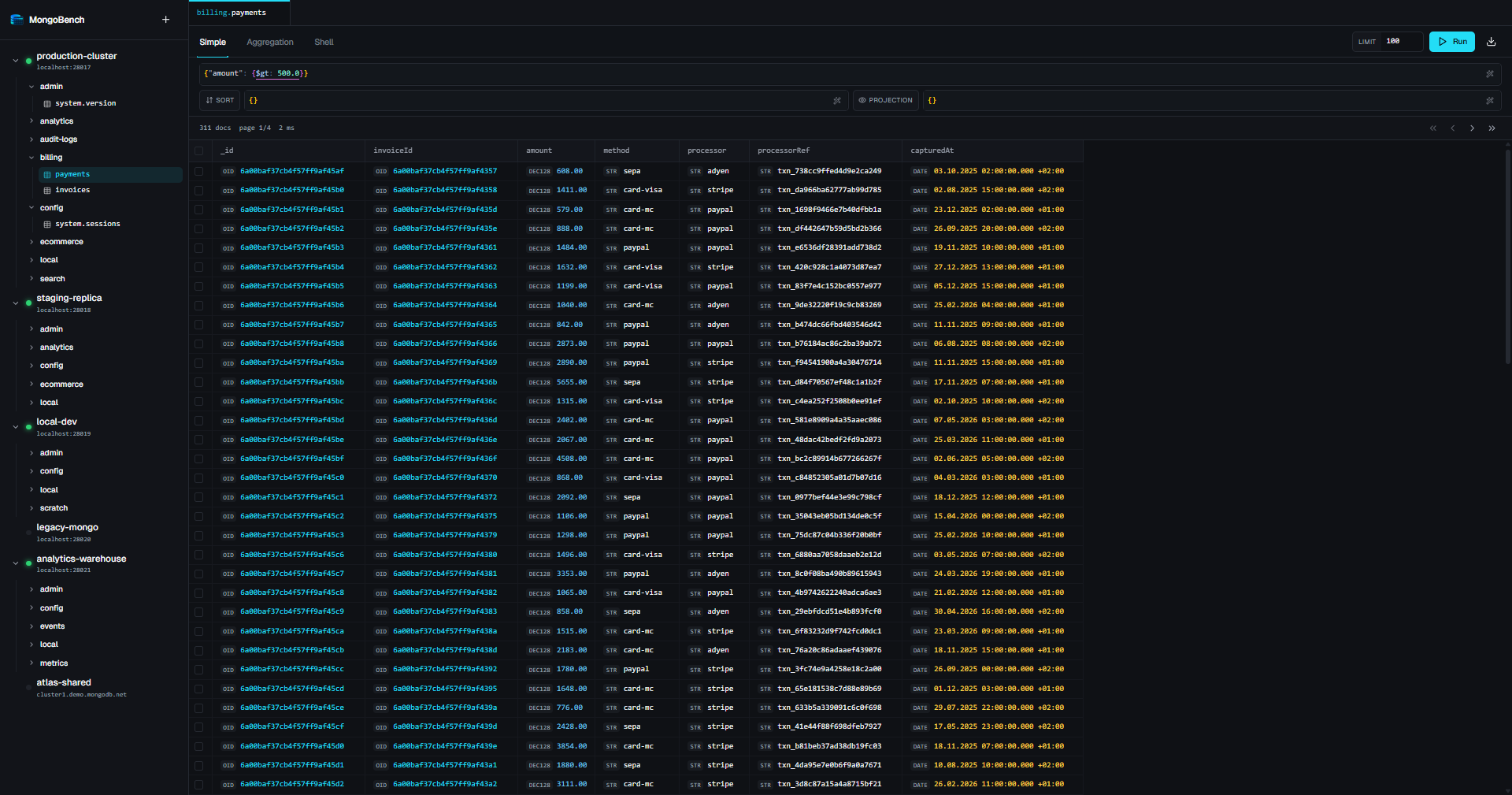
Type-aware rendering — ObjectId, Date, Decimal128, UUID, Long, Binary, regex — each with its own kind badge.
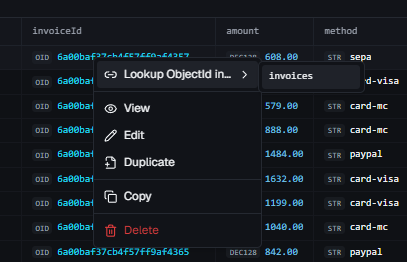
Right-click any row for View, Edit, Duplicate, Copy, Delete, plus a Lookup ObjectId in… submenu that jumps to the referencing collection.
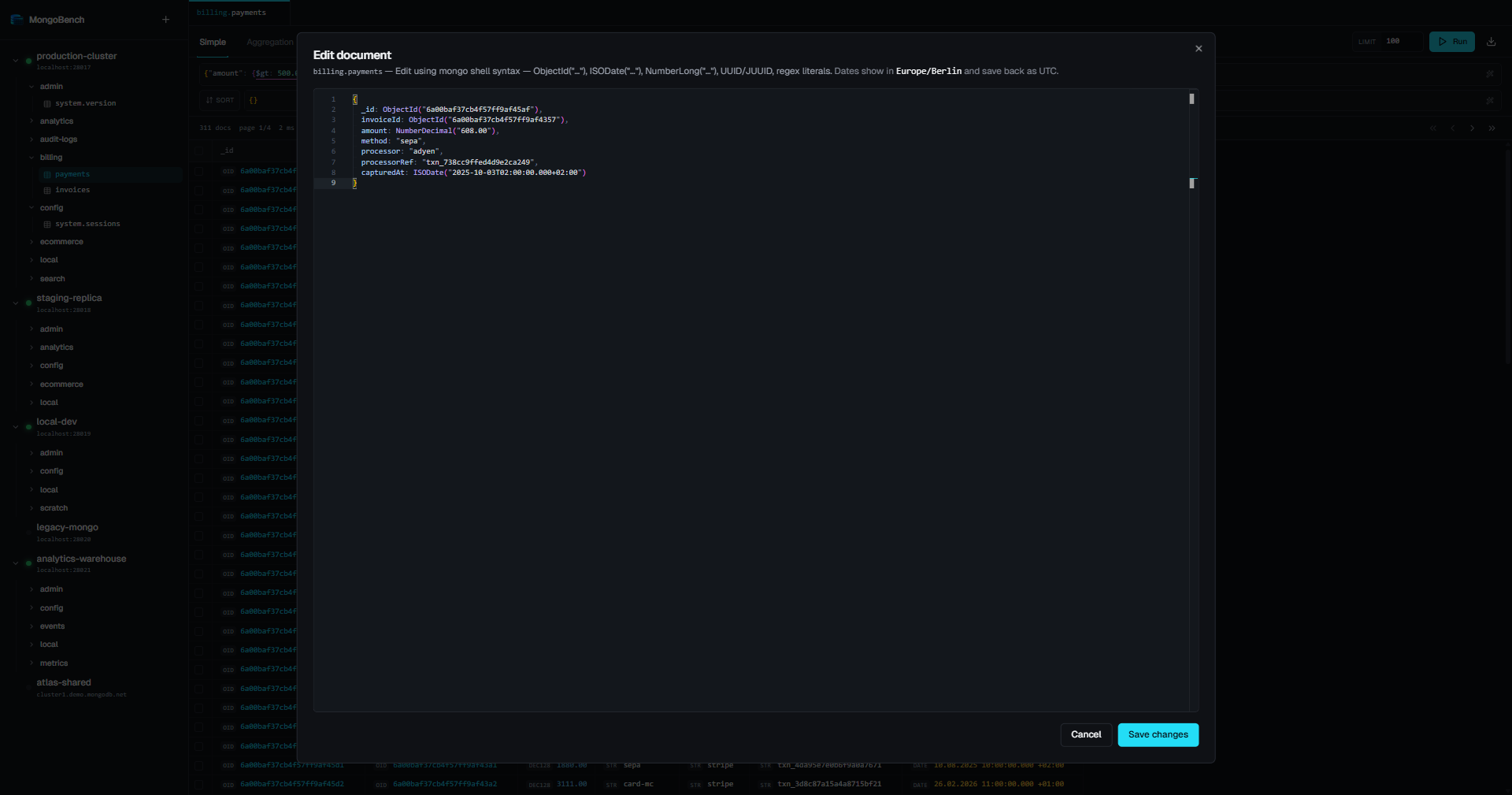
Monaco editor with mongo shell helpers (ObjectId(…), ISODate(…), NumberDecimal(…), UUID(…)). Hash-protected writes, view / edit / duplicate / insert modes.
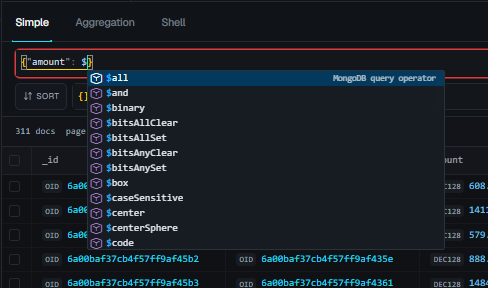
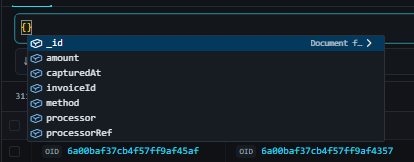
Operator autocomplete ($eq, $in, $elemMatch, $geoWithin, …) ranked by the field's type, and field-name autocomplete from a sample of the collection.
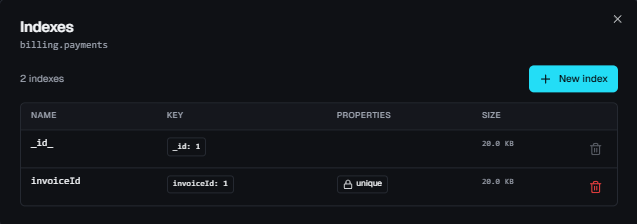
Per-collection index manager — list with key spec, properties, size and usage; create with full option surface (TTL, partial filter, collation, weights, 2dsphere, wildcard).
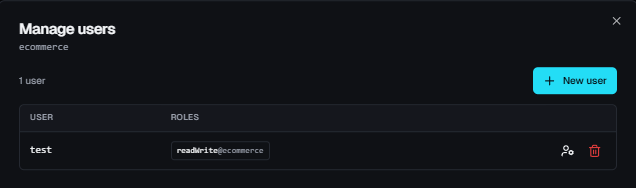
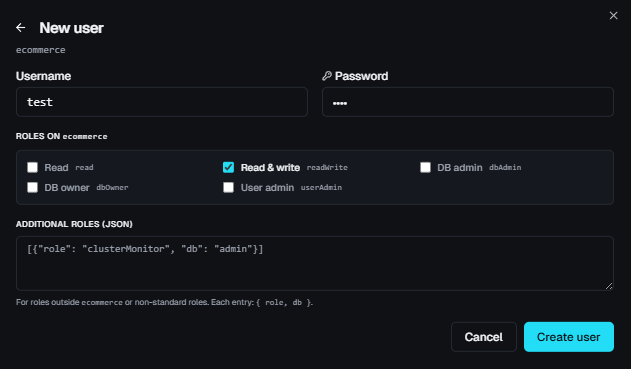
Per-database user management. A role editor for any role on any database, with one-click toggles for the common roles.
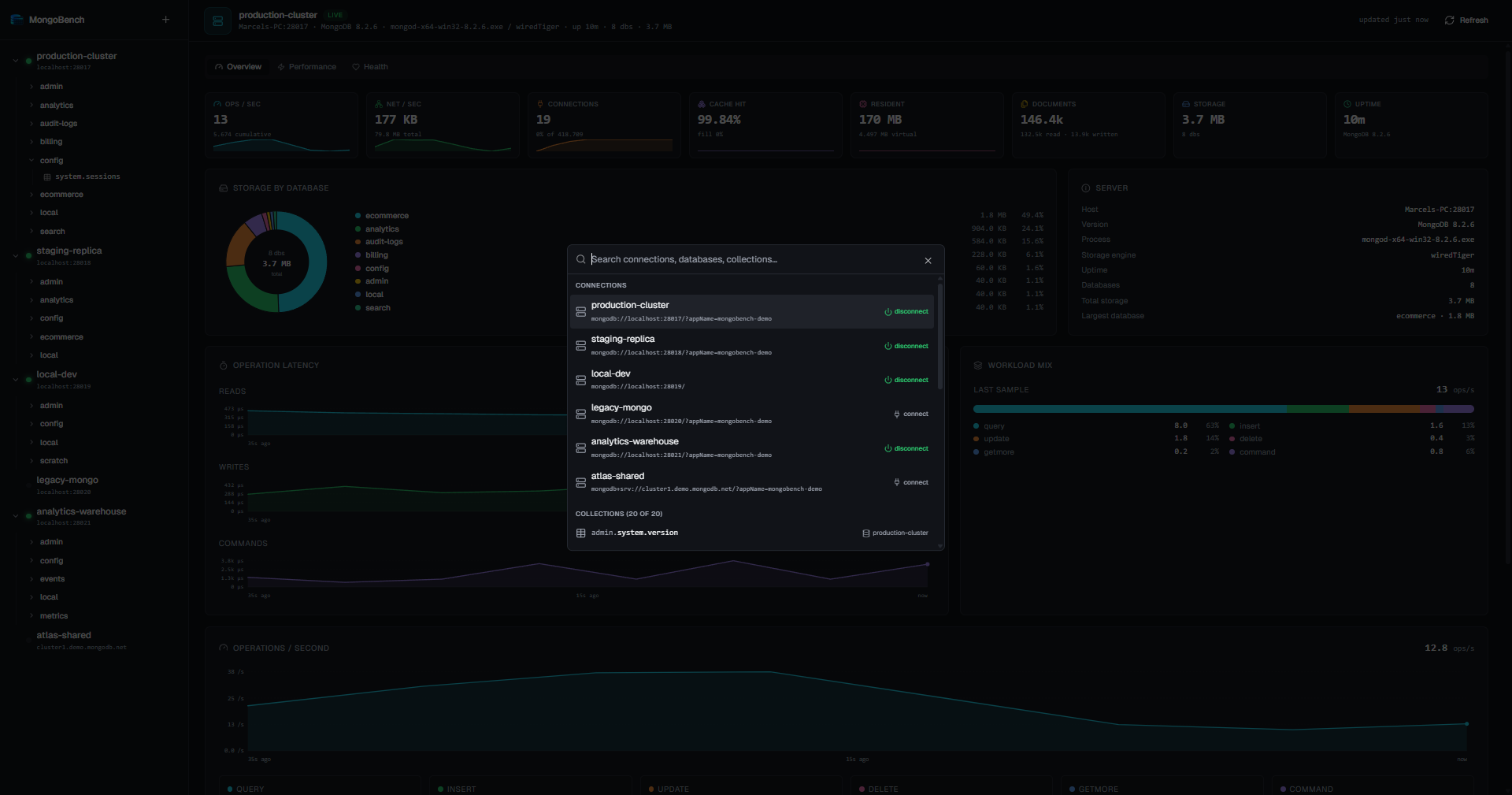
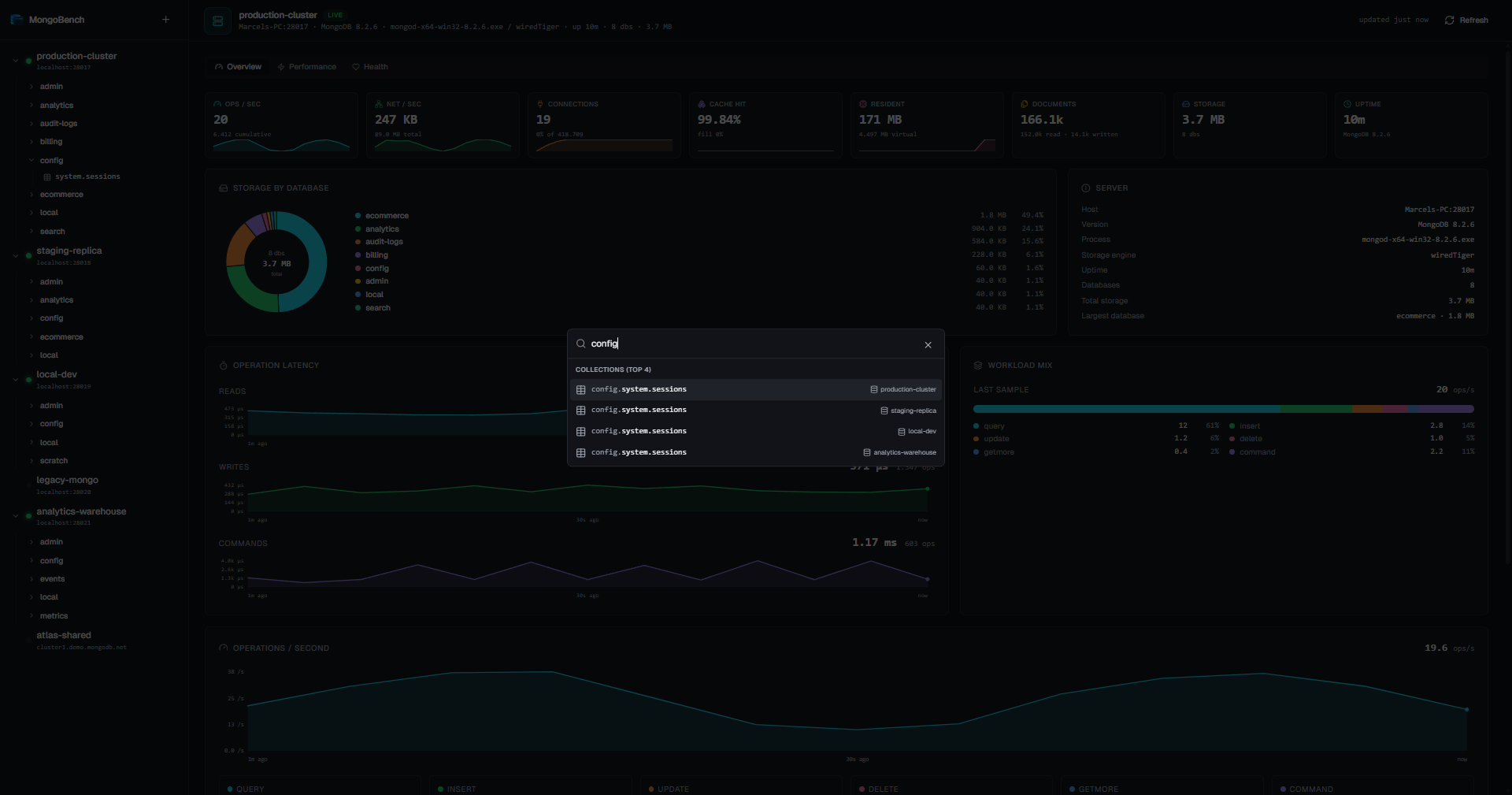
Ctrl+K / Cmd+K — fuzzy subsequence search across every active connection, database, and collection. Picking a result expands the sidebar and scrolls the row into view.
- Multiple active connections simultaneously, each with its own pool
- Encrypted password storage via OS keystore (Windows DPAPI, libsecret on Linux)
- Test before save — probes server, reports MongoDB version + ping latency
- SSH tunnel per connection, for hosts that are only routable from an SSH server:
- Auth via private key (+ passphrase), password, or the running SSH agent
- Key files are referenced by path — the key is read at connect time and never stored or copied
- Passwords and passphrases go into the same OS keystore as the MongoDB password
- Host keys are checked against your
~/.ssh/known_hosts; an unknown host is pinned on first use and itsSHA256:fingerprint surfaced for you to verify. A key that later changes is a hard failure, and so is a key yourknown_hostsmarks@revoked - Implemented as a loopback SOCKS5 proxy over the SSH session (with per-tunnel random credentials), handed to the driver as
proxyHost/proxyPort— so topology discovery works: list every replica-set member in the URI under the names the SSH server resolves.mongodb+srv://is the exception, as its DNS lookup still happens locally - A tunnel that dies takes its connection down and says so, instead of leaving a connection that only looks alive
- Cloudflare Access tunnel per connection, for a MongoDB behind a Cloudflare Access TCP application (Tunnel → Cloudflare Access in the form):
- MongoBench starts
cloudflared access tcpon a free loopback port when you connect and stops it when you disconnect — there is no host or port to enter, only the Access hostname - Auth via browser sign-in or a service token. For browser sign-in, cloudflared opens the browser only when it has no valid Access session and reuses the session until it expires; a toast explains the browser window and can reopen the sign-in page. A service token's secret goes into the OS keystore and reaches cloudflared through its environment, never its command line. A saved secret is only used for the hostname and client ID it was saved with; change either and the form asks for the secret again
- Uses
cloudflaredfromPATHor an executable you pick; the form shows the detected version. A picked executable must be a file on this computer named like a cloudflared release (cloudflared,cloudflared.exe,cloudflared-linux-amd64, …); network and UNC paths are refused - The tunnel reaches exactly one server, so
directConnectionis always on andmongodb+srv://is not supported. The connection string still carries credentials, database and options, but its host is never dialled — with TLS on, it names the certificate to expect. Choosing the tunnel fills an empty connection string withmongodb://localhost - cloudflared's own error (e.g. a rejected service token) is reported instead of a driver timeout, and a cloudflared that exits takes its connection down
- While connected, the loopback port is reachable by other local processes; MongoDB authentication still applies
- MongoBench starts
- Drag-to-reorder saved connections in the sidebar
- Right-click context menu per connection: connect / disconnect, edit, delete, new database, refresh, copy URI
- Full driver option surface, persisted per connection:
- URI:
mongodb://andmongodb+srv:// - Auth:
SCRAM-SHA-256,SCRAM-SHA-1,DEFAULT, customauthSource - Topology:
directConnection,replicaSet,readPreference(5 modes) - Pool:
minPoolSize,maxPoolSize - Timeouts:
connectTimeoutMS,socketTimeoutMS,serverSelectionTimeoutMS - Behavior:
retryWrites,retryReads,appName,tls - Display:
uuidEncoding(default / Java legacy), IANAtimezone,authorizedOnlyfilter
- URI:
- Three-level tree: connection → database → collection
- Live status dot per connection (connected / disconnected / busy)
- Right-click on a database: new collection, manage users, drop, copy name
- Right-click on a collection: open, open in new tab, info, copy namespace, insert document, manage indexes, rename, drop
- Distinct icons for collections vs. views
- Hover-quick-create buttons on database rows
- Active tab is highlighted in the sidebar; opening a tab from the palette auto-expands and scrolls to the row
- Clicking a collection focuses its most recently used tab, or opens one;
Ctrl/Cmd-click, middle-click or Open in new tab opens another tab of the same collection - Tabs of one collection are numbered
#1,#2, …; right-click a tab to duplicate or close it, middle-click closes it - Every tab keeps its own editors — text, cursor, scroll position and undo history survive tab and mode switches
- Edits are drafts: nothing runs until you press Run, and a dot on the tab marks a draft that differs from its last run
- Duplicate copies the drafts and the Simple result; Aggregation and Shell start idle in the copy, so an expensive pipeline doesn't run twice
- ObjectId lookups open the referenced document in a new tab, or re-run an earlier lookup tab you haven't edited
- Tabs follow a collection rename (an Aggregation result is cleared and waits for Run under the new name) and close when their collection or database is dropped or their connection disconnects; cached results of that namespace are discarded, so nothing stale comes back
| Mode | Surface | Highlights |
|---|---|---|
| Simple | filter · projection · sort · limit | EJSON or shell syntax; paged, with the total document count (estimated for an empty filter, count unavailable with the reason when the server can't count the filter, e.g. $where) |
| Aggregation | pipeline as [{ $match: … }, …] |
Read-only pipelines — $out / $merge are rejected (they run in Shell), and so is $changeStream, which never ends; at most 1,000 rows |
| Shell | db.coll.find({…}).sort({…}).limit(n) |
Reads and writes on any collection of the database — find, findOne, aggregate, countDocuments, count, estimatedDocumentCount, distinct (at most 1,000 rows), and the write methods below |
- Run: click button or
Ctrl+Enter/Cmd+Enter. When the input can't run (invalid filter, empty pipeline), the Run tooltip says why - Cancel: while a query runs, Run turns into Cancel — it aborts the operation on the server and the result area shows Run cancelled; a cancelled run starts again only when you press Run. In Simple mode a total count that is still loading never blocks Run. Closing a tab aborts its running queries as well, unless a duplicate of the tab still shows them. A Shell write can't be cancelled — the driver has no way to abort a write — so while one runs, the button shows Writing…
- Switching modes never runs anything: each mode shows its own last result; Aggregation and Shell show an example until their first run in that tab
- Result cap: Aggregation and Shell reads show at most 1,000 rows; the status bar flags a truncated result and how to reach the rest (
$skip/$limitstages,.skip()/.limit(), or a narrowerdistinctfilter). Simple mode keeps its own limit and pager — an empty or 0 limit fetches every match - Shell: address any collection as
db.name,db.a.b,db["name"]ordb.getCollection("name"); chainsort,skip,limit,projection,toArray,prettyafterfind, where.limit(0)means no limit. Comments and a trailing;are fine. Counts show as one large number —count()on an empty filter is estimated from collection metadata, like in mongosh;countDocuments()is always exact - Shell writes:
insertOne,insertMany,updateOne,updateMany(update operators or an update pipeline),replaceOne,deleteOne,deleteMany,findOneAndUpdate,findOneAndReplace,findOneAndDelete,bulkWrite, andaggregateending in$out/$merge(into any collection, also of another database), each with mongosh's options (upsert,arrayFilters,hint,collation,returnDocument/returnNewDocument, …). When the command writes, Run turns amber and its tooltip names the collection it writes to- A write runs exactly once, when you press Run — holding
Ctrl+Enter, a double-click on Run, switching tabs or modes, or a refresh after another write never repeats it updateMany/deleteManywith an empty filter (also insidebulkWrite) and a$outask for confirmation first- The result shows the counts that apply (inserted, matched, modified, upserted, deleted), the inserted or upserted
_ids, where$out/$mergewrote, and the document afindOneAnd*returned — Edit, Duplicate and Delete load the stored document first; a deleted one is read-only - Afterwards the written collection's results, its stats and the collection list refresh — after a failed write too, since an ordered
insertManyorbulkWritemay have written part - The legacy
insert,update,remove,saveandfindAndModifyname their modern replacement;drop, index and rename commands point to the explorer
- A write runs exactly once, when you press Run — holding
- Format:
Shift+Alt+F— re-prints filters, pipelines and shell commands, keeping shell helpers (comments are dropped)
- Field suggestions come from a random sample of up to 200 documents, taken when an editor gets focus and reused for 10 minutes; Refresh Field Suggestions in the editor's context menu samples again. Unprojected documents of the current result are folded in
- Keys suggest field paths ranked by how often they occur, with their types; values suggest the matching constructor (
ObjectId("…"),ISODate("…")in the connection's timezone,NumberLong("…"), …) and the field's most common values - Operators are ranked by the field's type —
$regexfor strings,$size/$elemMatchfor arrays, geo operators for coordinates - Pipelines: stage names and templates, the fields each stage produces (
$group,$project,$unwind,$lookup, …), expression operators with their named arguments, fields ranked by the type an argument expects, and$$variables with the subfields they hold.$lookupand$unionWithsuggest collection names and know the target collection's fields - Shell: collections of the database (as
getCollection("…")whendb.namecan't reach them), collection methods and cursor methods, and the arguments of write methods — update operators, update pipeline stages, option names andbulkWriteoperations - Document editor: keys and values from the same sample; suggestions open only on trigger characters or
Ctrl+Space, soEnterstill starts a new line. The index form suggests key fields from the same sample - Word-based suggestions are off, so text from other tabs never shows up
- Auto-sized table columns, drag-to-resize, per-collection persistence
- Multi-select with
Shift+Clickrange select - Right-click row: view, edit, duplicate, delete, copy as canonical EJSON, jump to referenced ObjectId (cross-collection lookup submenu)
- Row actions follow the result:
- Whole documents — Simple or shell
find/findOnewithout projection, pipelines of only$match/$sort/$skip/$limit— are edited and deleted directly - Projected rows are partial, so Edit, Duplicate and Delete first load the stored document by
_id - Rows of other pipelines,
distinctvalues and rows without_idare read-only: View, Copy and ObjectId lookups
- Whole documents — Simple or shell
- View / edit modes:
- Documents open in mongo shell syntax built from canonical EJSON (
ObjectId("…"),ISODate("…"),NumberLong("…"), …) - Shell-syntax accepted on input, parsed before send
- sha-256 hash precondition on
replaceOne/deleteOneto catch concurrent edits - Exact numeric types: documents are read without promoting BSON numbers, so a save writes back what was stored — Int32 as
NumberInt(…), Int64 asNumberLong("…"), Double as5.0/2.5/-0.0/NumberDouble("NaN"), Decimal128 asNumberDecimal("…") - Regular expressions keep their exact pattern and flags, including
s,xandu - On input, a plain integer becomes Int32 (Int64 when larger) and a literal with a
.or an exponent (5.0,1e3) a Double;Double(…)/NumberDouble(…)also take"NaN","Infinity"and"-Infinity".ObjectId()without arguments creates a fresh id
- Documents open in mongo shell syntax built from canonical EJSON (
- Bulk delete via multi-select + confirm
- After any write — from the table, the editor or the Shell — the visible result refreshes if it may read that collection — Simple, Aggregation, or a Shell command on that database. A hidden Simple result refreshes when you show it again; a hidden Aggregation or Shell result keeps its last data until you press Run
- A multi-document insert that fails part-way reports how many documents were already inserted
- Export the current result set as JSON, CSV or TSV
- Type-aware rendering in the table:
ObjectIdas hex string with kind badgeDaterendered in the connection's display timezone (IANA)UUID(BSON subType 4 always; subType 3 only ifuuidEncoding: "java", with byte-reversal)Decimal128,Longas exact stringsBinary,Regex, nested objects / arrays summarized
- List with name, key spec, type (1/-1/text/2dsphere/2d/hashed), TTL, uniqueness, sparseness, hidden flag, partial filter, collation, weights
- Create with full option surface:
unique,sparse,hidden,expireAfterSeconds,partialFilterExpression,collation,weights,default_language,language_override,textIndexVersion,2dsphereIndexVersion,bits,min,max,wildcardProjection; key fields are suggested from a sample of the collection - Drop with confirmation (
_idindex protected) - Size and Usage columns, both sortable:
- Size per index from
$collStats, summed across shards - Usage from
$indexStats: operations since the counters started, with a per-day rate; hover for the start date and the count per host - An index with no recorded use for at least a day is flagged unused (never
_id_, hidden, TTL or still-building indexes); indexes still being built carry a building badge - Counters reset when a mongod restarts; a note under the table names the hosts and shards they were counted on
- Size per index from
- Statistics load when the dialog opens and are never polled; Refresh reloads them. When a source needs a privilege you don't have (
indexStats,collStats), a notice says so and the rest still shows
- List per-database users with their roles
- Create with username, password (with a generator) and roles
- Role editor: any role on any database
- Suggestions from the server's roles (built-in and custom), the roles of listed users and the known databases
- One-click toggles for
read,readWrite,dbAdmin,dbOwner,userAdminon the current database - Roles grouped per database and filterable; while editing, added and removed roles stay marked until you save, and a removed role can be restored
- Update password and / or roles independently (preserve unchanged fields)
- Drop with confirmation
- Create / drop database (with confirmation, closes affected tabs)
- Create / rename / drop collection
- Collection info dialog: namespace, document count, average doc size, storage size (compressed + uncompressed), index count, free space, capped status — summed across shards on sharded clusters
Per-connection live view, sampled every 5 s, sliding 5-min history:
- KPIs: ops/sec, current connections (with cap), cache fill %, resident memory, total storage
- Charts with hover crosshair + tooltips:
- Operation latency (read / write / command, µs)
- Operations breakdown (query / insert / update / delete / getmore / command)
- Network throughput (bytes in / out)
- Storage pie: top databases + aggregated "other" wedge, total in the center
- Trigger:
Ctrl+K/Cmd+K - Fuzzy subsequence matching with prefix-aware scoring across all active connections (databases + collections + saved connections)
- Pre-fetches collection metadata when opened so search is instant
- Result actions: open collection (auto-expand + scroll in sidebar), connect / disconnect
- Dark theme with cool, neutral palette — no warm undertones
- Geist Variable for UI, JetBrains Mono for code; tabular numerals throughout
- Custom Monaco theme matching the app palette
- Custom scrollbars (Chromium): 10 px, transparent track, primary-tinted on grab
- Status indicators everywhere: spinners on pending operations, success / error toasts, hash-protected badges in the status bar
- Escape inside a dialog first closes the innermost popup — suggestion list, editor find widget, dropdown — and only then the dialog
| Platform | Download |
|---|---|
| Windows (x64) | MongoBench-Setup-<version>-x64.exe from Releases — NSIS installer, per-user, no admin |
| Linux (x64) | MongoBench-<version>-x86_64.AppImage — chmod +x and run |
| Arch / AUR | PKGBUILD shipped under packaging/arch/ or via AUR: paru -S mongobench-git / yay -S mongobench-git |
Builds are unsigned. On first launch on Windows you'll see SmartScreen — click "More info → Run anyway".
Installed builds ask GitHub Releases once at startup whether a newer version exists. If there is one, a notification appears in the corner — the further behind you are, the louder it is, and a missed major version is flagged in red.
Nothing happens until you act on it. Install update starts the download and shows its progress; Restart now hands off to the installer, or you can ignore it and the update is applied the next time you start MongoBench. Since these builds are unsigned, an app that swaps out its own binary unprompted is not something we're willing to ship — and an installer running silently while you work will close the app mid-session to replace its files.
The Arch package ships without an update feed and is updated through the AUR like any other package.
git clone https://github.com/ByteExceptionM/MongoBench
cd MongoBench
npm install
npm run dev          # launches the app with HMR
Useful scripts:
| Command | What it does |
|---|---|
npm run dev |
Run the app with hot reload (renderer) and main-process restart |
npm run build |
Build all three processes into out/ |
npm run dist:win |
Build a Windows NSIS installer into dist/ |
npm run dist:linux |
Build a Linux AppImage into dist/ |
npm run typecheck |
TypeScript project-references build, no emit |
npm run lint |
ESLint over src/ |
npm run format |
Apply Prettier |
npm test |
Vitest |
src/
├── main/        # Node side: window, services, IPC handlers, MongoClient pool
├── preload/     # contextBridge — typed API exposed to the renderer
├── renderer/    # React UI (Vite + Tailwind + shadcn/ui + Monaco)
└── shared/      # Types and Zod schemas shared across processes
- Electron 42 + TypeScript strict
- electron-vite — separate main / preload / renderer Vite configs
- React 18 + Zustand + TanStack Query
- Tailwind CSS v3 + shadcn/ui (Radix primitives)
- Monaco editor with custom
mongobench-darktheme - mongodb Node driver v7 + bson v7 (canonical / relaxed EJSON)
- electron-builder for packaging, electron-updater driving the user-initiated update flow
- Vitest for unit tests
- MongoDB 4.4+ (older versions may work but aren't tested)
- Auth mechanisms:
SCRAM-SHA-256,SCRAM-SHA-1,DEFAULT - TLS, replica sets, sharded clusters, direct connections
- IPv4 + IPv6, Atlas SRV, self-hosted, localhost
- Builds are unsigned — Windows shows SmartScreen on first launch
- No change-streams / live tail UI yet
- Shell mode runs one command per run — the reads and writes listed above, not the full mongosh grammar: no variables or JavaScript, no legacy write methods, no collection or index administration (the explorer does that)
- Shell writes can't be cancelled once they run, and they carry no hash precondition: they act on whatever matches when they run
- Aggregation and Shell reads stop at 1,000 rows; page with
$skip/$limitor.skip()/.limit(). A write result lists at most 1,000 inserted or upserted_ids - Cancel stops waiting for
distinctandestimatedDocumentCount, but cannot abort them on the server distinctshows Int32 and Double values as plain numbers, so it doesn't tell them apart (Int64 values stay exact); queried documents always keep their exact types- The document a
findOneAnd*returns may show an integral Double as an Int32 (Int64 values and regular expressions stay exact); editing it starts from the stored document, so no type changes on save. View and Copy show it as returned, so a copiedfindOneAndDeleteresult is not a type-exact backup of the deleted document - A Cloudflare Access tunnel reaches a single server: no replica-set discovery, no
mongodb+srv:// - macOS builds aren't published (the codebase runs on macOS in dev; binaries just aren't in the release matrix yet)
MIT.