
iOS's UIVibrancyEffect for Flutter — labels, icons and fills that take
their colour from the blur behind them, using the colour matrices UIKit
itself applies.


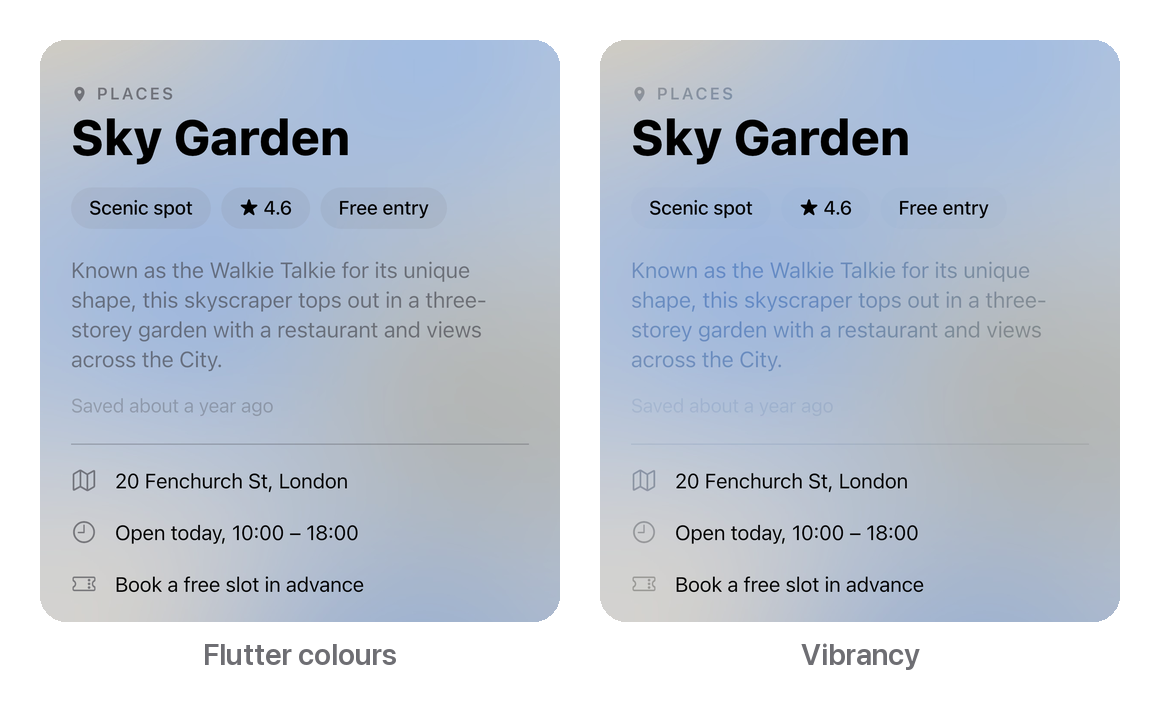
On iOS, secondary text over a blurred photo isn't grey. It's a deeper, more
saturated version of whatever lies behind each glyph: blue over sky, amber
over a sunset. UIKit gets this from a private Core Animation filter that reads
the backdrop and shows a colour matrix of it through the text's shape.
Flutter's CupertinoColors.secondaryLabel is a flat grey, so on a blur it
reads as a cut-out. This package recreates UIKit's filter, using the same
matrices applied to the same backdrop.
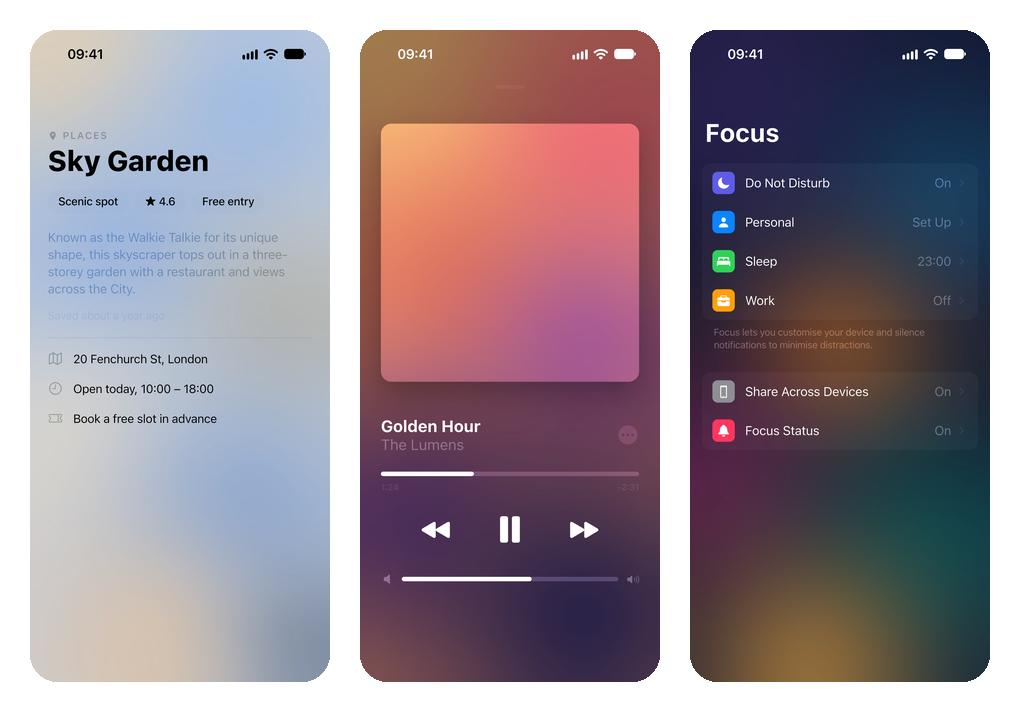
- UIKit's own matrices — every
UIVibrancyEffectStyleover every system material, in light and dark, read out of UIKit's layer tree. - Any content — text, icons, shapes and dividers. The child's shape is the mask and its colour is ignored, as in UIKit.
- One backdrop read per style — however many vibrant widgets share a
VibrancyScope. - Familiar — a
Vibrancywidget and aVibrancyScopeinherited down the tree, much likeOpacityandDefaultTextStyle. - Zero dependencies beyond the Flutter SDK.
dependencies:
  vibrancy: ^0.1.1
flutter pub add vibrancyRequires Flutter 3.44 and Dart 3.12 or later. Pure Dart: no native code, no platform setup.
Put a VibrancyScope over your blur, and wrap anything that should be vibrant
in a Vibrancy:
import 'package:vibrancy/vibrancy.dart';

Stack(
  children: [
    BlurredPhoto(place.photo),
    VibrancyScope(
      child: Column(
        crossAxisAlignment: CrossAxisAlignment.start,
        children: [
          Text(place.name, style: titleStyle),
          Vibrancy(
            child: Text(
              place.summary,
              style: TextStyle(color: CupertinoColors.secondaryLabel.resolveFrom(context)),
            ),
          ),
          Vibrancy(
            style: VibrancyStyle.tertiaryLabel,
            child: Text('Saved ${place.savedAgo}'),
          ),
        ],
      ),
    ),
  ],
)
That's all. In UIKit terms, it's a UIVibrancyEffect(blurEffect:style:) view
in the content of a UIVisualEffectView. In SwiftUI terms, it's
.foregroundStyle(.secondary) on a .regularMaterial.
Keep your colours. A
Vibrancyignores its child's colour, so give the child the colour it should have without vibrancy, such asCupertinoColors.secondaryLabel. Turn the effect off, on Android for instance, and the child falls back to that colour.
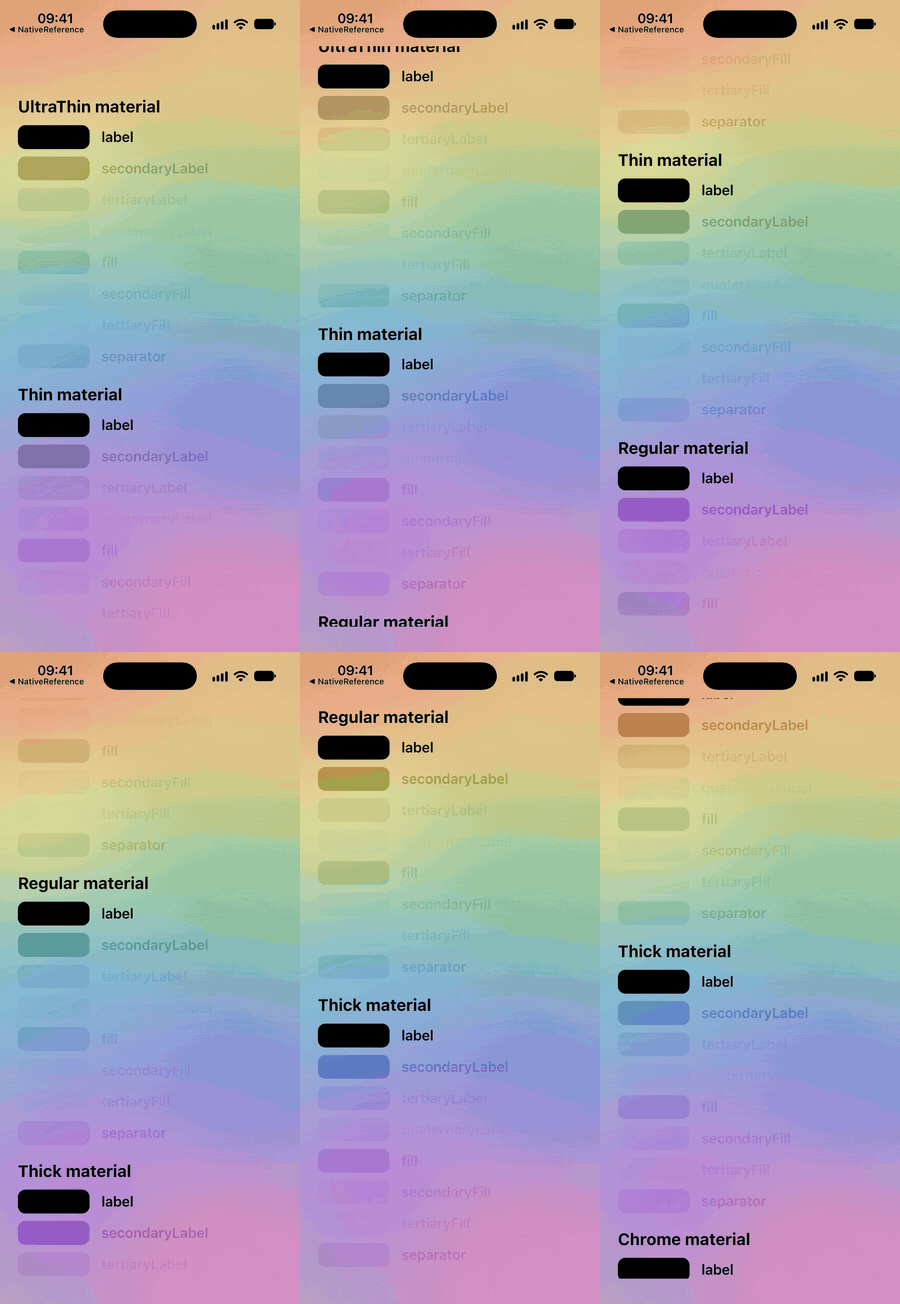
As in UIKit, vibrant widgets read the backdrop under their scope (the blur the scope sits on), not the scope's own content. Put the scope over the blur, not around it:
// ✅ The blur paints first; the scope reads it.
Stack(children: [blur, VibrancyScope(child: content)])

// ❌ The scope is read before the blur paints.
VibrancyScope(child: Stack(children: [blur, content]))
Content can scroll, animate and move freely inside the scope. Each vibrant widget takes its colour from the part of the backdrop it's over, frame by frame, as the list on the right does.
A Vibrancy with no scope reads the backdrop directly beneath itself.
VibrancyStyle |
For |
|---|---|
label |
Primary text. UIKit draws it as it is, with no vibrancy. |
secondaryLabel |
Subtitles, captions, eyebrows. Default, as in UIVibrancyEffect(blurEffect:). |
tertiaryLabel |
Placeholders and timestamps. |
quaternaryLabel |
Watermarks. |
fill |
Thin and small shapes, such as a slider's track. |
secondaryFill |
Medium shapes, such as a switch's background. |
tertiaryFill |
Large shapes, such as a chip or a text field. |
separator |
Separators and hairlines. |
VibrancyMaterial describes the blur the content sits on: ultraThin,
thin, regular (the default), thick or chrome, matching UIKit's
system…Material styles. It selects the matrices tuned to that blur, and
thinner materials let more of the backdrop's colour through. The package
doesn't blur anything itself; the material only describes your blur.
Brightness follows the platform's, as UIKit's trait collection does. If your
app's theme overrides it, set it on the scope.
VibrancyScope(
  material: VibrancyMaterial.thin,
  brightness: Brightness.dark,
  enabled: Platform.isIOS, // Off elsewhere: children keep their own colours.
  child: ...,
)Over a known, solid colour, VibrancyStyle.colorOver returns the colour UIKit
would draw, and colorFilter returns the matrix as a ColorFilter for an
image or a ColorFiltered:
final caption = VibrancyStyle.secondaryLabel.colorOver(
  cardColor,
  material: VibrancyMaterial.thin,
);Reading the backdrop is the expensive part. On Impeller it ends the render
pass and copies the scene. A VibrancyScope reads it once per style, at the
top of the frame, and every Vibrancy below draws from that copy. Each
Vibrancy also draws its child in one small offscreen layer.
Scrolling forty place cards (four vibrant pieces each, about twenty on screen at a time) on the iOS simulator:
| Raster p50 | p90 | |
|---|---|---|
| Vibrancy off | 1.0 ms | 1.5 ms |
| Vibrancy on | 3.9 ms | 5.0 ms |
To keep it cheap:
- Use one
VibrancyScopefor as large a surface as shares a blur. A whole scrolling page over a fixed photo costs one read per style. - Wrap a column of same-style labels in one
Vibrancyrather than one each.
On Impeller a Vibrancy can sit under an Opacity, a FadeTransition or a
ShaderMask, and its child can have compositing layers of its own, as long
as the VibrancyScope is outside the fading widget. A backdrop is read from
the layer it's in, so a scope inside a fading layer would read that layer
rather than the blur. On Skia and the web, keep the fade outside the
Vibrancy and its child free of its own layers.
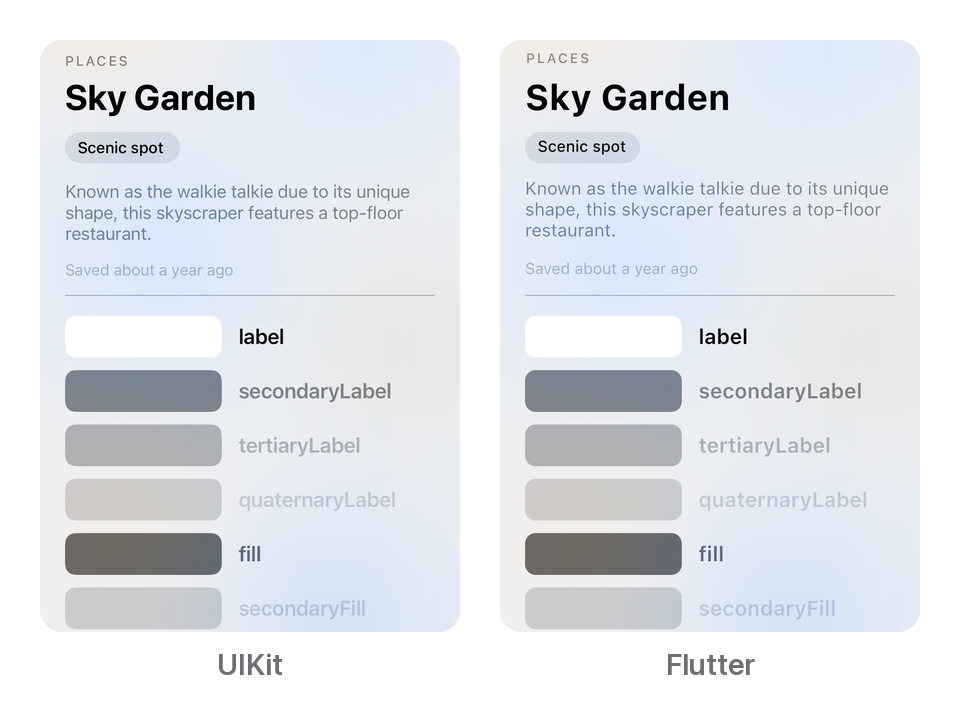
A native UIKit reference app and the example app draw the same pages on the same simulator, and the screenshots are compared pixel by pixel.
- The matrices are read straight out of UIKit's layer tree, not fitted. UIKit's own output matches them to within 0.3/255.
- Over solid colours, the package's output matches the same matrices to within 0.5/255.
- Over a photo, with every style under each material in light and dark, the package is within 1/255 of UIKit in every patch.
| No blur | UIKit's materials blur, saturate and tone-map the backdrop. This package leaves that to your own blur and only adds the vibrancy on top. |
| Legacy blur styles | .light, .extraLight, .dark, .regular and .prominent use an older vibrancy filter and aren't included. |
| Translucent backdrops | A VibrancyScope assumes the blur it reads is opaque, as a blurred photo is. Over a translucent backdrop the vibrant colours can differ. |
| Platform | Support | Notes |
|---|---|---|
| iOS | ✅ | Measured against UIKit; one backdrop read per style per scope |
| Android, macOS | ✅ | The same Impeller path as iOS; not yet checked on a device |
| Web, Windows, Linux, Skia | ✅ | One backdrop read per Vibrancy; covered by the widget tests |
The effect looks like iOS on every platform. If you want platform-native
colours instead, set enabled: false off iOS.
Vibrancy |
Draws its child in a colour taken from the backdrop |
VibrancyScope |
Sets the material, brightness and on/off state for the vibrant widgets below it, and reads their backdrop |
VibrancyStyle |
The role of vibrant content, as UIVibrancyEffectStyle names it, with colorOver and colorFilter |
VibrancyMaterial |
The material content sits on, as UIBlurEffect.Style names it |
The example/ directory is a gallery of four screens over blurred
photos, with a switch that turns vibrancy off so you can compare.
cd example
flutter run
How the matrices were measured, and how the parity screenshots are taken, is
described in docs/design.md and
tools/parity/README.md.
Contributions are welcome. See CONTRIBUTING.md for how to set the project up and what a good pull request looks like. This project follows the Contributor Covenant.
MIT. See LICENSE.