
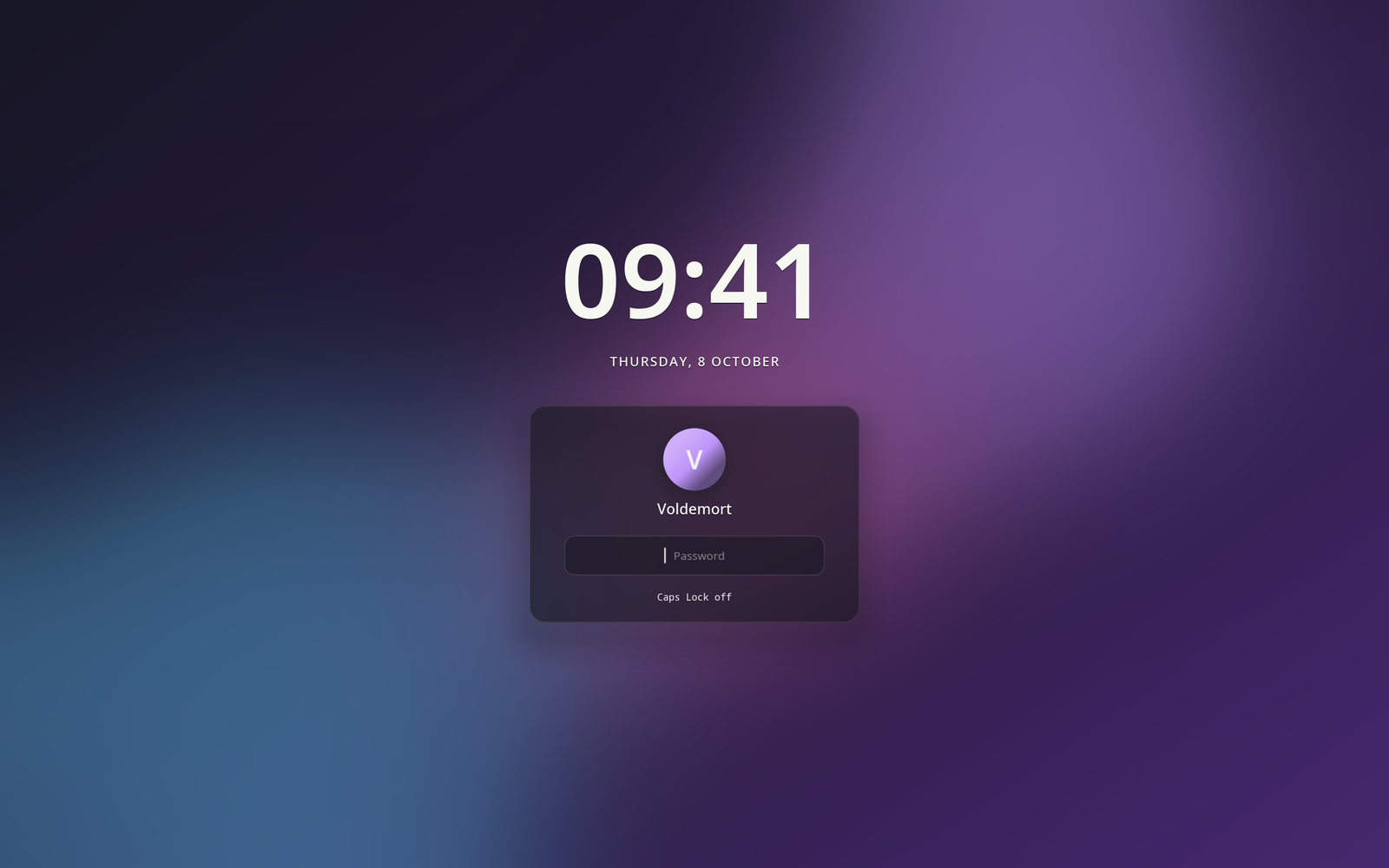
A greetd greeter for Hyprland —
the same screen as hyprforge-lock, in front of a login instead of an
unlock. It draws nothing of its own: hyprforge_authui::screen is the
screen and hyprforge_authui::conversation is the exchange; this crate
supplies a window and talks to greetd. That's the whole reason the
greeter and the lock screen look like one system — not because they
were styled to match, but because there is one of them.
It draws with the lock screen's renderer too: the greeter forces iced's
software tiny-skia backend (ICED_BACKEND, set in main) and never
uses wgpu, because wgpu blends translucent colours in linear light and
the card's glass came out a visibly different strength on each screen.
A login screen needs no GPU driver.
Part of Hyprforge, a suite of native Hyprland desktop apps — but it runs alone.
The compositor that runs this greeter has no keybinds. Not one.
config/hyprland-greeter.lua is deliberately empty of binds and of any
exec_cmd beyond launching the greeter itself. Whoever is standing at
the keyboard in front of a login screen is unauthenticated, and every
keybind that compositor has belongs to them. A greeter compositor with
the usual SUPER + Q -> terminal hands that person a root-adjacent shell
as the greeter user without logging in — the classic way greeters get
broken into — and nothing inside hyprforge-greet itself can prevent
it, because the bind fires in the compositor, before this program ever
sees the keypress.
This has been verified live: with the login screen on screen, added
binds were still reachable. If you are extending this greeter, do not
add a "harmless" bind to that config file — a volume key today is a
terminal bind added "just for testing" next to it tomorrow. If you need
a keyboard shortcut on the login screen, it has to be handled inside
hyprforge-greet's own event loop, where it can be scoped to what the
greeter itself is doing, never dispatched to the compositor.
cargo build --release -p hyprforge-greet
It depends on two other Hyprforge crates, hyprforge-authui and
hyprforge-look, published on crates.io,
so cargo fetches them from there and never needs the main repository. Nothing else here is Hyprforge-specific.
A greeter runs as its own user, and $HOME for a normal account is
drwx------ — so the theme and monitor layout it draws with are not
read from your config. They come from a copy exported to
/var/lib/hyprforge/greet, written by the Settings app (theme.toml +
wallpaper) and by hyprforge-displayd (monitors.lua) when your own
session applies them. INSTALL.md in this crate covers setting up that
export directory, the sysusers/tmpfiles units that create it with the
right group permissions, and the full install sequence — read it in
full before installing this as your login manager; it is written so
every step up to the last is reversible from a spare virtual terminal.
While a question is open, the greeter asks for an input method through
text-input-v3 (src/ime.rs), as a password field when the question is
secret. What an input method commits reaches the entry through the same
grammar as a typed key; its pre-edit is never drawn or kept, and no key
counts while a composition is under way, so nothing is entered twice.
tests/live_text_input.rs checks the compositor offers the protocol.
What answers it is fcitx5, with most of it switched off. When fcitx5
is installed, the greeter starts it in its own compositor
(src/input_method.rs; --no-input-method to opt out). An input method
before login is the no-key-binds rule arriving through another door —
whoever is at the keyboard is unauthenticated, and fcitx5 carries a
settings tool, a restart and, in some engines, keys that start other
programs. So it runs with --disable=all and only an allow-list of
addons whose source was read for this: the Wayland frontend, the
candidate window, plain keyboard layouts, and the pinyin, table, rime and
hangul engines. Every menu that starts a program lives in an addon that
list leaves out; anthy is left out because it binds F11 and F12 to a
dictionary editor. The module's doc lists each one, with where in
fcitx5's source it was found.
- Not for passwords. fcitx5 passes a password field straight through as plain keys, and that is pinned on here: composing a password would show it in the candidate window, in clear.
- Nothing learned is kept. Its configuration and data are made fresh
under
$XDG_RUNTIME_DIRat each start. - Which input methods it offers comes from
/var/lib/hyprforge/greet/fcitx5-profilewhen there is one — a copy of your~/.config/fcitx5/profile, beside the exported theme — and from your locale otherwise. Only that file is read. - IBus is never started here. Its Wayland input method is its GTK panel, which is also the menu that opens its settings; one cannot run without the other.
Not installed is the usual case, and then the login screen is exactly what it was.
Do not try this against a real greetd installation while iterating.
testing/fake_greetd.py is a stand-in: a real AF_UNIX socket, the real
greetd wire framing (native-endian u32 length + JSON), but scripted
replies — so a framing bug shows up against the fake, not at an actual
login prompt.
cd /some/short/scratch/dir
../../.../testing/fake_greetd.py sock hunter2 &
GREETD_SOCK=sock ./target/debug/hyprforge-greet --user you --type-in hunter2
Run the fake server from a directory with a short path: AF_UNIX caps
socket paths at roughly 108 bytes, which a deep scratch directory can
exceed, so bind a short relative name rather than an absolute one. Real
greetd uses /run/greetd.sock; that constraint belongs to the test
harness alone.
--type-in (debug builds only, compiled out of release) is what proves
the whole handshake end to end, including the final start_session —
there is no other way to exercise that without a keyboard. It never
appears in a release build, because a flag that submits a password from
argv puts it in ps output, which a login screen must not offer no
matter how convenient it is while developing.
.github/workflows/ci.yml builds the crate, runs clippy with warnings
denied, and runs cargo test. Its one #[ignore]d test,
tests/live_text_input.rs, asks a running compositor whether it offers
zwp_text_input_manager_v3 (read-only; the suite's tools/hf check
runs it in the live tier). Everything CI runs is still only the code
talking to itself. It never runs hyprforge-greet against real greetd
or the fake one, and it never touches the compositor that
config/hyprland-greeter.lua configures. Proving the handshake actually
works still means the testing/fake_greetd.py walkthrough above, by
hand.
MIT. See LICENSE.