
An ext-session-lock-v1 lock screen for Hyprland, sharing its look with
the greeter (hyprforge-greet) — not by styling to match, but because
both draw the same screen from hyprforge-authui.
Part of Hyprforge, a suite of native Hyprland desktop apps — but it runs alone. Installing this gets you a lock screen and nothing else.
cargo build --release -p hyprforge-lock
It depends on six other Hyprforge crates — hyprforge-authui,
hyprforge-paths, hyprforge-look, hyprforge-image, and the UPower
and NetworkManager clients hyprforge-power and hyprforge-network —
published on crates.io,
so cargo fetches them from there and never needs the main repository. Nothing
else here is Hyprforge-specific.
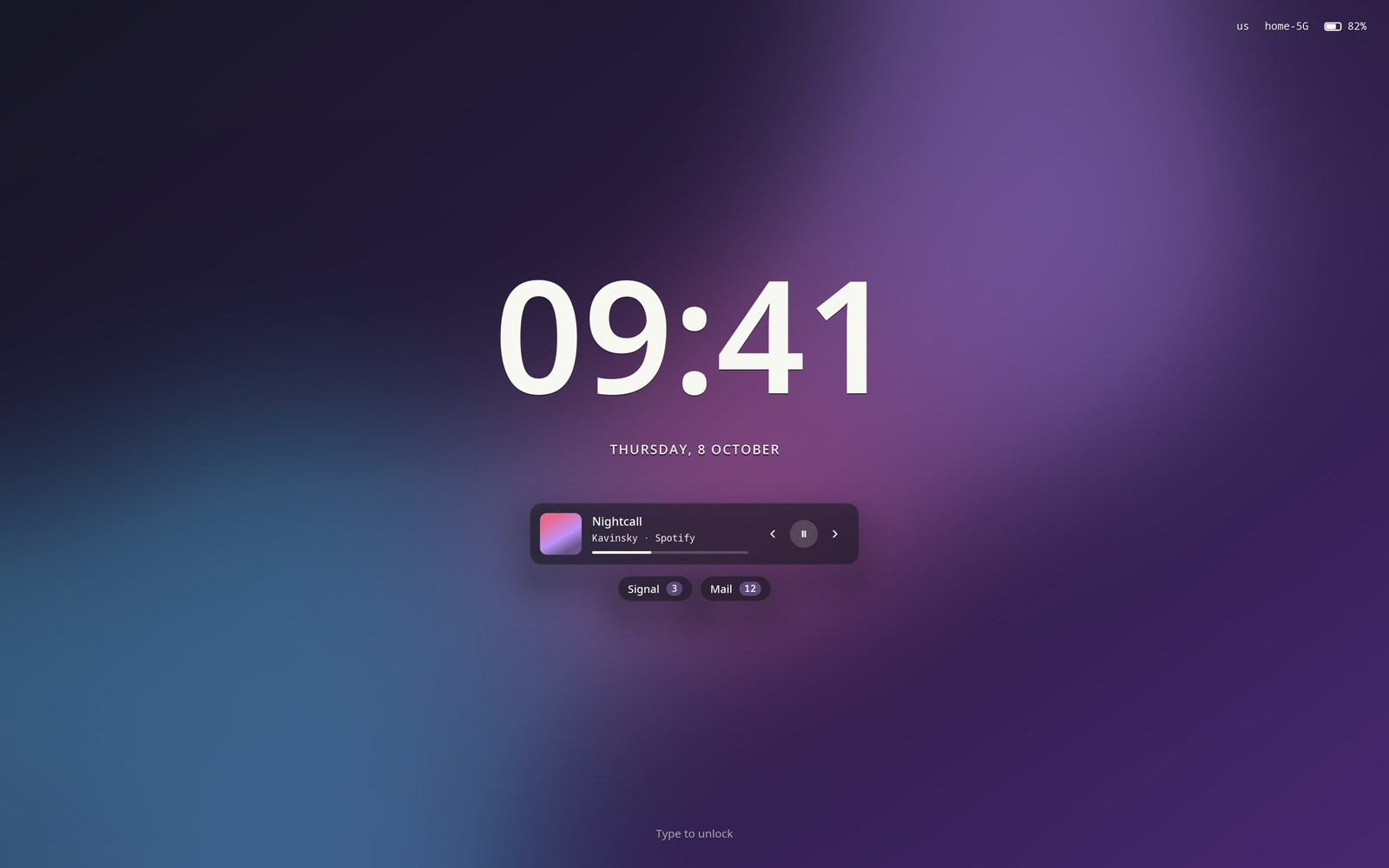
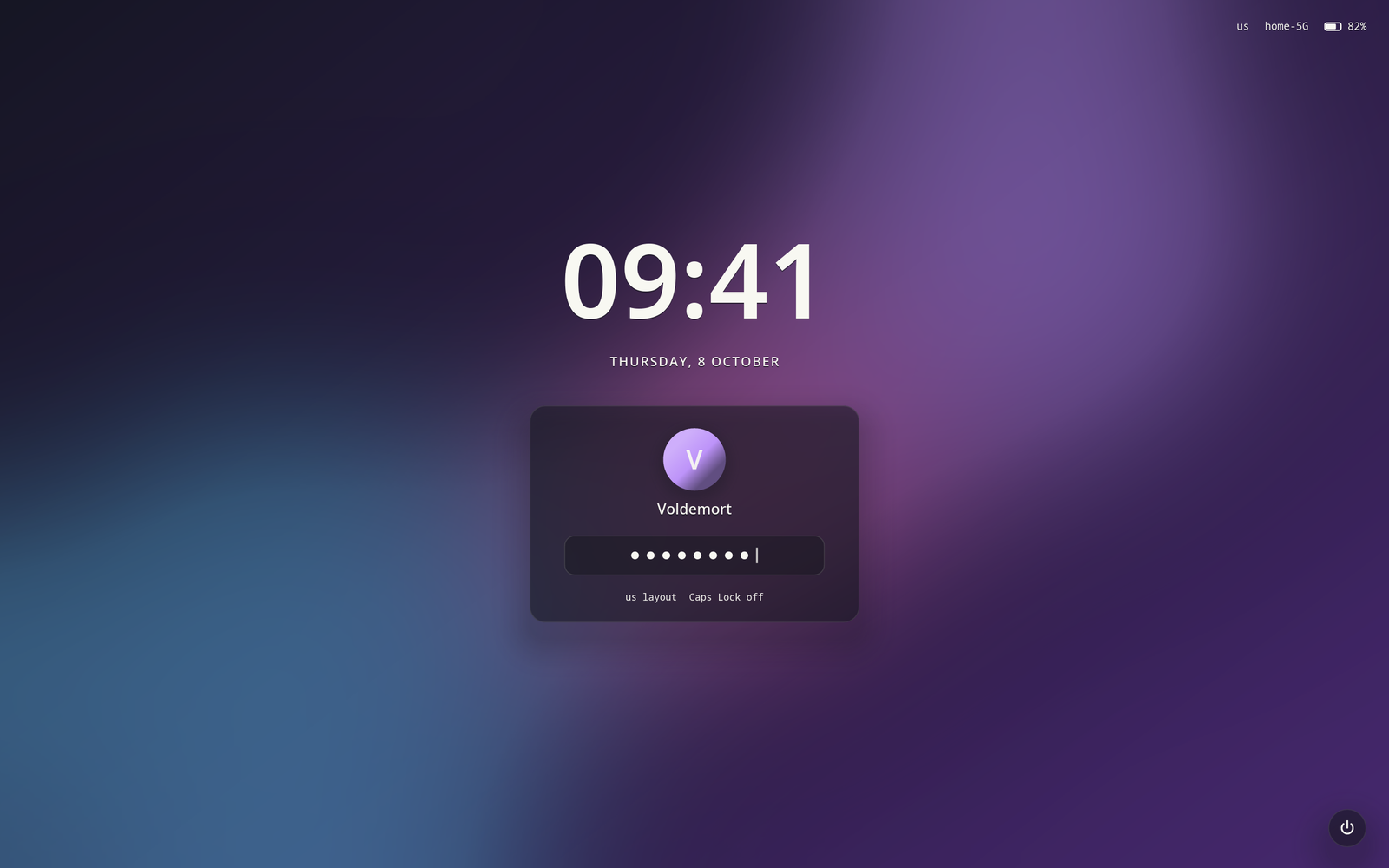
An idle clock that brings up a frosted card when you type — avatar,
name, the password as dots, the keyboard layout and Caps Lock — with a
status line (layout, network, battery), media controls and per-app
notification counts on the idle screen, and a power menu from ⏻ or Tab.
A wrong password shakes the field red. On several monitors the card is
on the one with the keyboard and the others show only the clock. It
draws at each output's real resolution through wp_fractional_scale_v1.
Every part beyond the password is somebody else's daemon, and each one being absent is a screen without that part, never a lock screen that fails: no UPower, no battery reading; no fprintd, no fingerprint.
With fprintd installed and a finger enrolled (fprintd-enroll), the lock
listens for a finger beside the password prompt, talking to fprintd
directly rather than through pam_fprintd — PAM can ask for one or the
other in turn, never both at once. A match still has to pass the PAM
account stack before the session unlocks, and three unrecognised
fingers stop the reader until the next lock.
This binary authenticates against PAM, and PAM refuses to authenticate against a service with no configuration file — so without a PAM file, nobody can unlock the session. Install one:
sudo install -Dm644 pam/hyprforge-lock /etc/pam.d/hyprforge-lock
Both the auth and account stacks are needed in that file, and the
second is the one that's easy to leave out. Authentication is not
authorisation: an account can have the right password and still be
expired, locked, or barred from the host, and unlocking a session PAM
had refused would be a real hole. Borrowing /etc/pam.d/hyprlock does
not work for this reason — it declares only auth include login, so its
account stack is empty and falls through to /etc/pam.d/other
(account required pam_deny.so), which denies a correct password after
PAM's own auth stack has just accepted it.
If no hyprforge-lock PAM service is installed, the code falls back to
login, which declares both stacks. It never falls back to hyprlock,
for the reason above.
Never point this at the session you are actually using. A lock client killed while holding the lock leaves the session locked with nothing left to unlock it — that's by design; a lock screen that released on a signal would be useless. Recovering from that means restarting the compositor, or:
hyprctl --instance <N> eval 'hl.clear_crashed_lockscreen()'
What it does about its own crashes is the next section; it changes none of this. So development and testing happen against a disposable nested compositor, never the real one:
./testing/nested.sh
./target/debug/hyprforge-lock --display wayland-2 \
    --fake-password hunter2 --type-in hunter2
nested.sh starts a clean Hyprland instance on wayland-2 and prints
its instance signature. Run it before every attempt — it also kills
any previous nested instance first, matched on the config path rather
than pkill -f (a -f pattern also matches the shell invoking it).
--fake-password and --type-in only exist in debug builds —
--fake-password is compiled out of release builds entirely, so the
binary people actually install has no known-string bypass one flag
away. In debug builds it additionally refuses to run against the
display it would have connected to anyway (do not export
WAYLAND_DISPLAY=wayland-2 yourself alongside --display; that defeats
the check). Never test a wrong password against real PAM either —
pam_faillock is active on a typical machine at three attempts, and two
typos there locks the account, which is worse than a locked screen.
--type-in <wrong> against --fake-password exercises the failure path
without touching a real account.
The binary you run is a supervisor. It starts a copy of itself with
--child, which does all the work, and waits; it never connects to
Wayland or renders, so nothing that crashes the screen can reach it.
When the child crashes — a panic, or a signal — the supervisor starts
another, and Hyprland hands the dead lock to it. From the second crash
on, the copy runs in safe mode: the default theme, no wallpaper, no
avatar, no status line, no fingerprint reader, and no power menu — not
its ⏻ button either, since with nothing asking logind it could carry
out none of what it offered. A fourth
crash within a minute and it stops (exit 4), leaving the session locked
behind Hyprland's own screen. Nothing the supervisor does unlocks.
The takeover needs Hyprland's misc:allow_session_lock_restore, which
is off by default. With it off the relaunch is refused, and the
supervisor exits 3 naming the option; the session stays locked as the
crash left it. Hyprforge's Settings app turns it on from its Set up page.
To stand in for a crash when testing, kill -ABRT the child (pgrep -P <supervisor>). kill -SEGV from outside does not work: Rust's standard
library catches SIGSEGV to detect stack overflows and, for a signal that
was not a real fault, carries on. To abandon a test lock, kill the
supervisor before the child, or the child is simply started again.
It reports what PAM said and nothing more. Rate limiting, lockouts and
delays are PAM's own configuration in /etc/pam.d/, not policy hidden in
this binary — with one exception it cannot avoid: fprintd keeps no count
of failed fingers and PAM never sees them, so the three-miss limit on the
reader is this binary's. Under --fake-password the power menu only
rehearses, because a nested test lock still talks to the real system
bus. And while PAM is busy — pam_unix sleeps for about two
seconds after a wrong password — the screen keeps drawing and keeps
accepting input; a lock screen that stops repainting is indistinguishable
from one that crashed, and the user's only other option is a hard
reboot.
.github/workflows/ci.yml builds the crate, runs clippy with warnings
denied, and runs cargo test. That is everything a runner with no PAM
service, no D-Bus session and no compositor can honestly ask. It never
launches hyprforge-lock itself — not even with --fake-password —
because a runner is not a nested compositor and this is not something
to relax "just for CI". Proving the screen actually locks, draws and
unlocks still needs ./testing/nested.sh and a human watching it, as
described above.
MIT. See LICENSE.