
A lightweight notification daemon and control center for Wayland, built from
scratch in Rust. Implements the org.freedesktop.Notifications D-Bus spec,
so it's a drop-in replacement for dunst/mako. Optimized for Hyprland, portable
to any wlr-layer-shell compositor.
Zero-bloat by design: no UI frameworks, no tokio/calloop — just smol-family async, tiny-skia for rendering, and cosmic-text for font shaping (emoji/CJK/RTL all work out of the box).
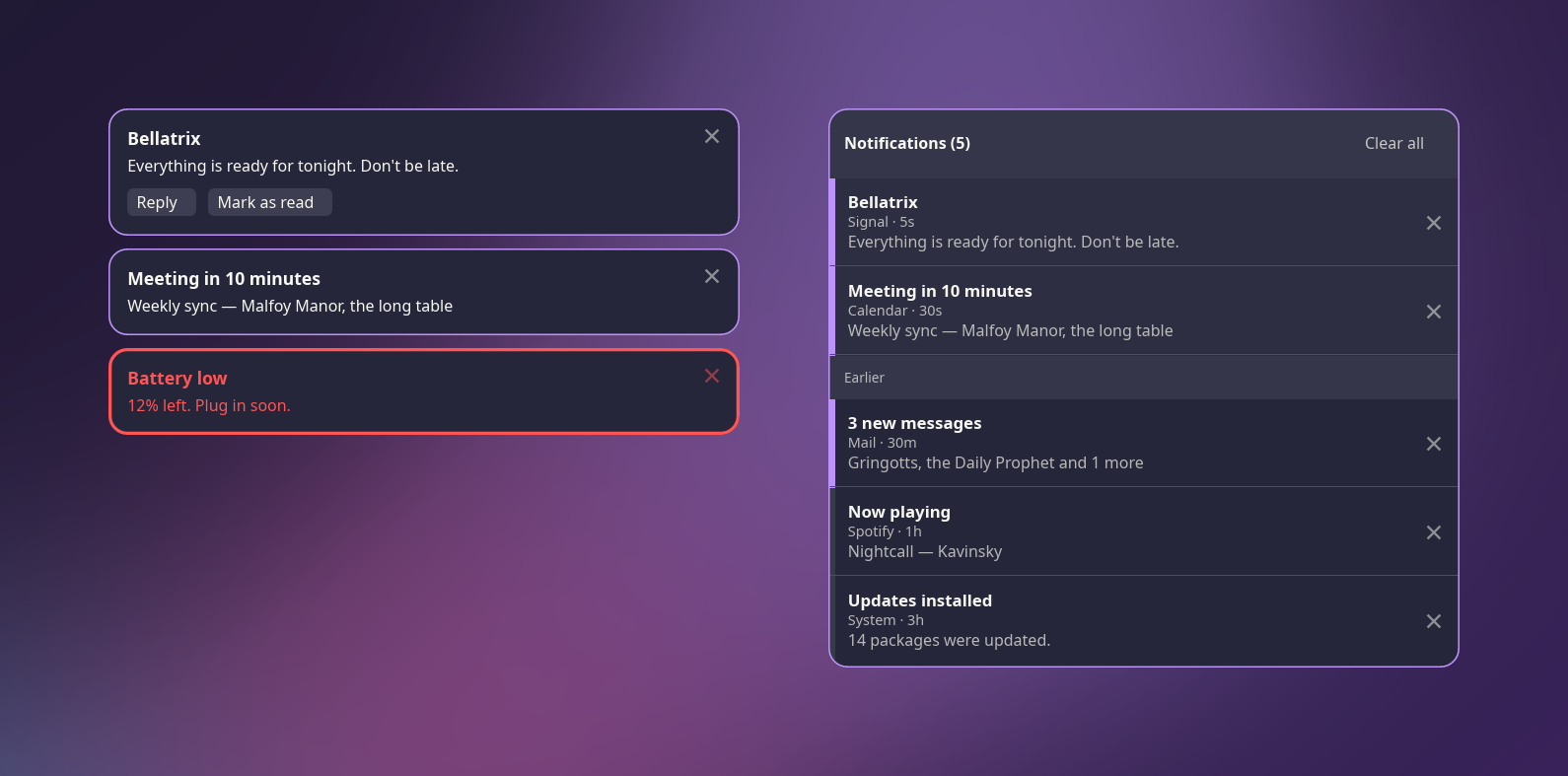
- Full
org.freedesktop.NotificationsD-Bus server — urgency levels, actions, body markup, images/icons,replaces_id, transient/resident notifications. - Popup toasts rendered directly onto Wayland layer-shell surfaces (no compositor-side blur — ask Hyprland for it with a layer rule instead; see Hyprland integration).
- Fractional scaling done correctly (crisp at 1.25x, 1.5x, etc.).
- Notification history ring, kept from the first notification.
- Do Not Disturb mode — normal notifications are silently filed to history; critical notifications always break through.
- A notification-center panel (second layer surface), anchored to its own corner with independent styling, showing currently-active notifications live followed by history, with per-entry dismiss and "clear all".
notifctl, a small CLI to control the daemon over a local socket: dismiss/close, toggle DND, toggle the center panel, query history/status.- Hot-reloading config file — edit
config.toml, save, and the running daemon picks it up immediately.
Single process, single-threaded async (smol's LocalExecutor + async-io
reactor). Everything is a message over async-channel — no shared mutable
state, no Mutex. A central core state machine owns all notification
state and is the only source of truth; the D-Bus and Wayland layers are pure
translators in and pure projections out.
                 ┌────────────┐   DbusCmd    ┌──────────────┐
 D-Bus (zbus) ──▶│ notif-dbus │─────────────▶│              │
                 │            │◀─────────────│  notif-core  │
                 └────────────┘  DbusSignal  │ (state, IDs, │
 inotify ───────▶ ConfigEvent ──────────────▶│  expiry,     │
                 ┌────────────┐   UiEvent    │  history,    │
 Wayland ───────▶│  notif-wl  │─────────────▶│  DND)        │
 (layer-shell,   │  + render  │◀─────────────│              │
  seat, shm)     └────────────┘  UiCommand   └──────────────┘
                                                    ▲
                     notifctl ── IPC socket ────────┘
| Crate | Responsibility |
|---|---|
notif-types |
Shared message/data vocabulary. No I/O, no policy. |
notif-config |
Config loading, validation, inotify hot-reload. |
notif-dbus |
The org.freedesktop.Notifications D-Bus server (zbus). All hint parsing lives here. |
notif-core |
The state machine — notification lifecycle, expiry timers, history, DND, IDs. Synchronous, channel-free, 100% unit-testable. |
notif-render |
Renderer trait + a tiny-skia/cosmic-text implementation (toasts + center panel). |
notif-wl |
Wayland: layer-shell surfaces, seat/pointer input, shm buffers (via smithay-client-toolkit). |
notif-ipc |
The notifctl control socket protocol + server. |
notifd |
The daemon binary — wires everything together. |
notifctl |
CLI client for the control socket. |
notif is part of Hyprforge,
a suite of native Hyprland desktop applications, where it lives as
crates/hyprforge-notif; this repository,
hyprforge-notif, is where
its code lives, and the monorepo references it as a submodule. It takes two of the
suite's libraries, hyprforge-look and hyprforge-paths, from crates.io,
so it builds on its own. Nothing else in the suite is required: with no
Hyprforge theme published on the machine, it draws in the theme's defaults.
The binaries keep the names they always had — notifd and notifctl — and
so does the layer namespace, notif, so existing keybinds and layer rules
keep working.
The suite's split package builds it as hyprforge-notif, which replaces the
old notif-git. From a checkout of the suite:
git clone https://github.com/hyprforge-suite/hyprforge.git
cd hyprforge/packaging/arch
makepkg -si
That builds every package in the suite; install just this one with
sudo pacman -U hyprforge-notif-*.pkg.tar.zst. It installs notifd,
notifctl, and a systemd user unit (notifd.service). There is no AUR
package.
Or with the suite's installer, which puts the binaries in /usr/local/bin
and the unit in ~/.config/systemd/user:
./hyprforge --install --notifRequires the Rust toolchain pinned in rust-toolchain.toml. From this
repository, or from crates/hyprforge-notif in a Hyprforge checkout:
cargo build --release --workspace
# binaries at target/release/notifd and target/release/notifctlClaim the notification bus name directly:
notifdOr via systemd (recommended — auto-restarts, starts with your graphical session):
systemctl --user enable --now notifd.servicenotifd will exit if another notification daemon (dunst, mako, ...) already
owns org.freedesktop.Notifications on the session bus — disable/mask it
first.
The Arch package enables notifd.service for every user when it is
installed, through a systemd preset. If dunst, mako or swaync is
installed, it does not: only one of them can run, and a package cannot
ask which one you want. With Hyprforge Settings installed, its Set up
page (or hyprforge-settings --setup) names the other daemon before it
replaces it, binds notifctl center and notifctl dnd, and can undo
all of it, which re-enables the daemon it replaced.
Blur behind the toasts and the centre panel is the compositor's job. With
Hyprforge Settings installed, hyprforge-settings --setup (or its Set up
page) adds it for you. By hand, in a Lua hyprland.lua — Hyprland 0.55
and later read Lua, and the older hyprlang layerrule = blur, notif
lines are not valid there:
hl.layer_rule({ name = "notif-blur", match = { namespace = "^notif$" }, blur = true })
hl.layer_rule({ name = "notif-center-blur", match = { namespace = "^notif-center$" }, blur = true })
The namespaces are anchored because an unanchored notif also matches
notif-center. Hyprland rejects a layer-rule field it does not know, and
a rejected rule fails the whole file it is in, so add only what you have
checked against your Hyprland version.
Usage: notifctl <subcommand> [options]

Subcommands:
  dismiss-all         Dismiss all active notifications
  close <id>          Close notification by ID
  history [--json]    Show notification history
  clear-history       Clear notification history
  dnd                 Toggle do-not-disturb mode
  center              Toggle notification center panel
  status [--json]     Show daemon status
Bind whichever of these you want to a key, e.g. in Hyprland:
bind = $mainMod, N, exec, notifctl center
bind = $mainMod SHIFT, N, exec, notifctl dnd
notifd reads $XDG_CONFIG_HOME/notif/config.toml (usually
~/.config/notif/config.toml) on startup, and hot-reloads it on save —
no restart needed. A missing file just means defaults. Point it elsewhere
with notifd --config <path>.
Every field below is optional. Colours, fonts and corner rounding fall back
to the Hyprforge theme this machine publishes — the same lock.toml the
lock screen and the Settings app read — so notifications match your windows
without being told the colours twice. Setting one here stops that value
following the theme.
The values shown beside the commented-out colour lines are what the built-in theme gives, which is what you see on a machine where nothing else has been configured. Everything else falls back to the default shown.
# Corner to anchor the notification stack.
# Options: top_left, top_right, bottom_left, bottom_right
anchor = "top_right"

# Margins from the screen edge, and gap between stacked notifications (px).
margin_x = 12
margin_y = 12
gap = 8

# Toast size bounds (px), and how many can be visible at once (others queue).
max_width = 400
max_height = 200
max_visible = 5

# Font. From the theme (gsettings, times its accessibility scale) unless
# set here.
# font_family = "Sans"
# font_size = 15.0

# Icon size (px).
icon_size = 48

# Wayland output name to render on. Omit/null = compositor-chosen (usually
# the focused output).
# output = "DP-1"

# How many notifications the history ring keeps (oldest dropped past this).
history_limit = 100

# Parse the small <b>/<i>/<u>/<a> markup subset in notification bodies.
body_markup = true

# Notification-center panel width (logical px, 1-8192).
# Deprecated: use [center].width instead.
center_width = 400

# Notification-center panel overrides. Every field is optional and falls
# back to the corresponding top-level value above (colors/border/radius
# fall back to [normal]) when unset. The panel shows currently-active
# notifications live, followed by history, and re-anchors to its own
# corner independent of the toast stack's anchor.
[center]
# anchor = "top_right"
# margin_x = 12
# margin_y = 12
# width = 400
# max_entries = 100
# font_family = "Sans"
# font_size = 15.0
# background = "#26263a"
# foreground = "#f8f8f2"
# border_color = "#bd93f9"
# border_width = 1
# corner_radius = 12

# Per-urgency appearance. Sections: [low], [normal], [critical].
# The commented colours are the theme's, not literals notif carries.
[low]
# background = "#26263a"    # theme: surface
# foreground = "#f8f8f2"    # theme: foreground
# border_color = "#373a47"  # theme: card border - present, not shouting
# border_width = 1
# corner_radius = 12        # theme: rounding
default_timeout_ms = 5000   # 0 = never expire
ignore_timeout = false      # if true, always use default_timeout_ms

[normal]
# border_color = "#bd93f9"  # theme: accent, i.e. general:col:active_border
# border_width = 1
default_timeout_ms = 8000
ignore_timeout = false

[critical]
# foreground = "#ff5555"    # theme: error
# border_color = "#ff5555"  # theme: error
# border_width = 2
default_timeout_ms = 0      # never auto-expire critical notifications
ignore_timeout = true
A fully-commented copy of this file (kept in sync with the actual defaults by
a test) lives at crates/notif-config/examples/config.toml.
See PLAN.md for the full architecture contract — module responsibilities, message types, crate choices, and the invariants a change must not break. CLAUDE.md has the condensed version plus the command cheat-sheet:
cargo build --workspace
cargo test --workspace
cargo clippy --workspace --all-targets -- -D warnings
cargo fmt --checkMIT — see LICENSE.