
The Settings app for Hyprforge — an iced GUI of
nineteen pages in five sidebar groups: Get started (Set up), System
(Displays, Power & battery, Keyboard & mouse, Default apps), Connectivity
(Network, Bluetooth),
Hyprland (Windows & workspaces, Keybinds, Animations, Window rules, Idle &
lock, Session, Advanced) and Personal (Appearance, Wallpaper, Night light,
Screen sharing, Tray) — src/main.rs's Screen enum and NAV. A search
palette in the header finds any page, setting or config key.
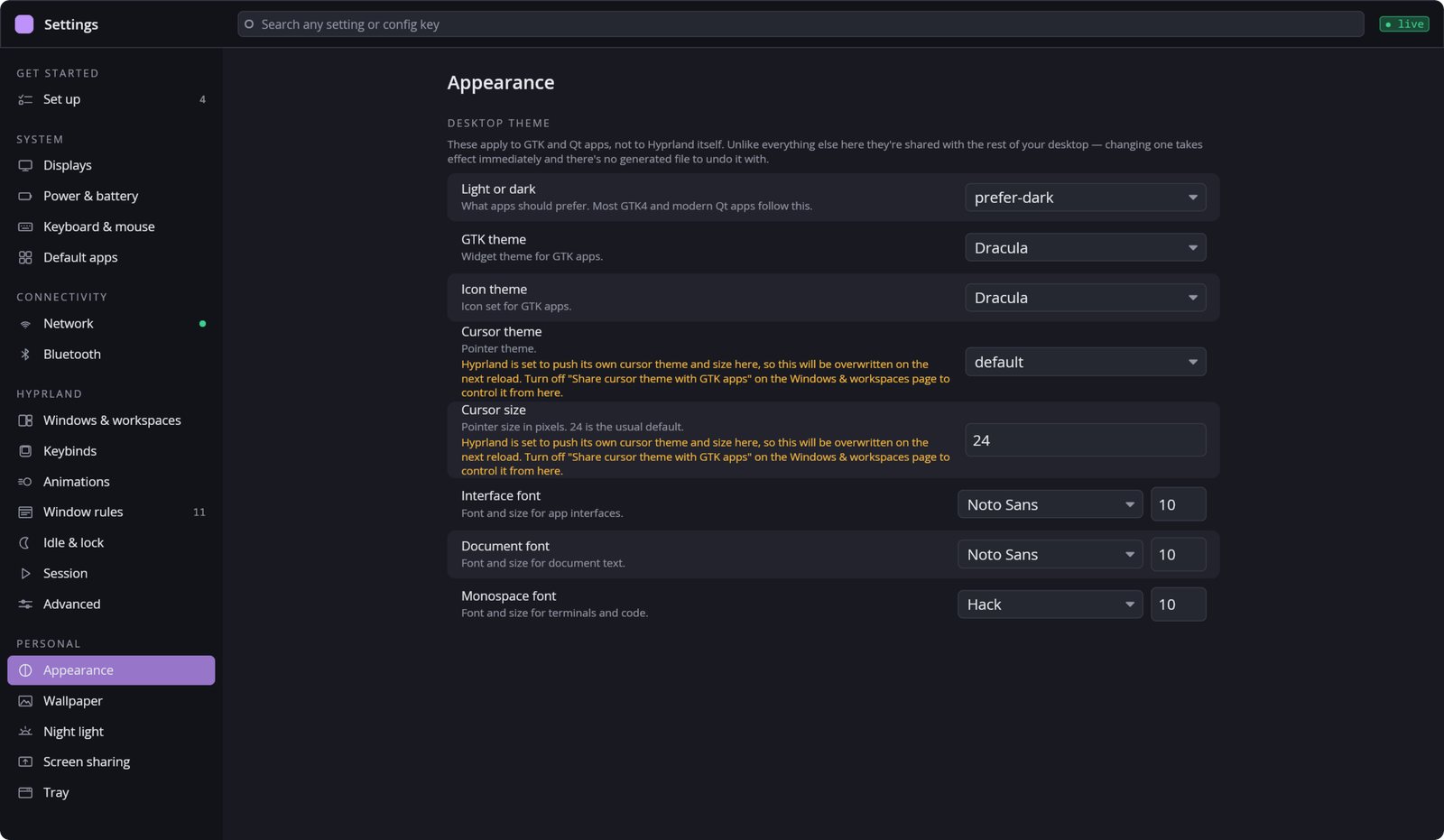
The pages are drawn by fourteen modules, each a SettingsModule
(src/module.rs) under src/modules/, modeled directly on iced's own
update/view split so a module feels like a miniature iced application
rather than a bespoke plugin API. Some modules back several pages —
Appearance's and Desktop's tabs are pages of their own — and the shell,
not the module, draws every page's title, sidebar entry and
pending-changes bar.
Part of Hyprforge, a suite of native Hyprland desktop apps.
hyprforge-clipboard, hyprforge-lock, hyprforge-greet and
hyprforge-tray each depend on two to nine other Hyprforge crates.
This one depends on eighteen: hyprforge-core, hyprforge-ui,
hyprforge-windowrules, hyprforge-input, hyprforge-appearance,
hyprforge-look, hyprforge-paths, hyprforge-ecosystem,
hyprforge-session, hyprforge-system, hyprforge-shortcuts,
hyprforge-lua-import, hyprforge-network, hyprforge-bluetooth,
hyprforge-power, hyprforge-tray, hyprforge-mime and
hyprforge-setup. That is why
the suite's docs/design/repo-plan.md splits it last, and why a standalone hyprforge-settings
repository is the least "standalone" of the suite's components — building it fetches most of its
libraries from crates.io. It is a real settings app you can build and test on
its own; it is not a small one.
cargo build --release -p hyprforge-settings
Its Hyprforge dependencies are published on crates.io, so cargo fetches them from there and never needs the main repository. Nothing else here is Hyprforge-specific.
This is not a viewer. Saving a setting here edits the user's actual
hyprland.lua (through hyprforge-appearance, hyprforge-windowrules,
hyprforge-input, hyprforge-shortcuts and the rest), and several
screens' tests exist specifically because a bug here once meant a save
silently clobbered configuration it should have left alone.
Develop and test this against an isolated $XDG_CONFIG_HOME, never
your real one. Every module that writes config already has a test
helper that repoints
$XDG_CONFIG_HOME at a throwaway tempfile::tempdir() before touching
the module under test — with_temp_config in modules/appearance.rs,
modules/input.rs, modules/session.rs, modules/desktop.rs,
modules/network.rs, modules/bluetooth.rs and modules/tray.rs, with_isolated_module
in modules/window_rules.rs, and a guard type in
modules/shortcuts.rs — and every one of them holds the same
modules::CONFIG_ENV_LOCK while it does — a per-module lock would not be
enough, because the variable is process-global and two modules'
temp-directory tests can otherwise race each other mid-assertion. Do
the same by hand: run the binary itself with XDG_CONFIG_HOME pointed
at a scratch directory, not your home directory, whenever you are
exercising it manually rather than through cargo test.
Give a copy run by hand its own XDG_RUNTIME_DIR too, if Settings is
already open in your session. It is single-instance through a lock and
a control socket in that directory, so a second copy that finds them
does not open a window at all — it hands its --screen to the running
one and exits 0, and the page you were testing turns up in your own
window instead. Keep that directory's path short: a Unix socket path is
limited to 108 bytes, and a long one silently truncates the path
hyprctl connects to, so every page that asks Hyprland something reports
that it could not. /run/user/$UID/<name> fits.
--screen <name> opens a given page and --search <text> opens with the
palette showing, which is how a page is reached for a screenshot.
--setup finishes an install without opening a window: the services,
keybinds, idle lock, notification blur, default apps and open/save
dialog the installer used to print as instructions, each checked and
applied through hyprforge-setup and recorded in
~/.config/hyprforge/setup.toml so it can be undone.
hyprforge-settings --setup              ask about each item that is to do
hyprforge-settings --setup --yes        apply every item that is on by default
hyprforge-settings --setup --list       each item's state
hyprforge-settings --setup --porcelain  one id<TAB>state<TAB>reason line per item
hyprforge-settings --setup --undo [id]  undo what setup recorded
The Set up page (--screen setup, src/modules/setup.rs) is the same
list in the window: each item's state, a switch for each one still to
do, one Apply, and Undo for whatever setup recorded doing. On a first
launch — nothing recorded yet and something still to do — Settings opens
on it, unless --screen named another page; the check runs off the UI
thread, and one that takes longer than two seconds leaves the window
where it opened rather than move it under someone already using it.
It writes real config, so test it against a scratch XDG_CONFIG_HOME
like everything else here. The modes that write hand off to a Settings
window that is already open, rather than write beside it; --list and
--porcelain only read and always answer. Exit status is 0, 1 when an
item failed, 2 for a usage error.
Displays only draws its arrangement canvas with two or more monitors. To
see it on a one-monitor machine, run hyprforge-displayd run --mock and
this app together on a private session bus, and give the mock monitors
with hyprforge-displayctl simulate-topology 'BOE:0x0BC9:,DELL:U2723QE:X':
dbus-run-session --config-file=testing/private-bus.conf -- <script>
The private bus is what keeps the mock off the name the real daemon owns.
The config is what keeps the test off your session: a stock session bus
auto-starts whatever is asked for, and iced's theme detection asks for
the desktop portal — which started xdg-desktop-portal and its Hyprland
backend against the real compositor, from the environment the bus
inherited. testing/private-bus.conf has no service directories, so
nothing can be activated on it.
The Appearance screen resolves one hyprforge_look::Theme and
publishes it in two places, because two other processes need it and
neither can read this app's own config directly:
~/.config/hyprforge/lock.toml(hyprforge_paths::lock_toml_path) — read byhyprforge-lock, which runs as the same user and can read an ordinary config file./var/lib/hyprforge/greet(hyprforge_look::theme::EXPORT_DIR, overridable for tests viaHYPRFORGE_GREET_DIR) — read byhyprforge-greet. A greeter runs as its own dedicated user, and a normal account's$HOMEisdrwx------, so the greeter has no way to traverse into it to read the theme or the wallpaper directly. This export directory is the copy it is allowed to see instead, written whenever the Appearance screen republishes the look — including on a system-font change alone, which is easy to forget to wire up and has been the exact bug once before (seea_font_change_reaches_the_lock_screen_and_the_greeterinmodules/appearance.rs).
Every save that changes the look republishes both, which is the whole
reason a shared Theme is safe to depend on elsewhere in the suite —
see the upstream CLAUDE.md's "Never add a colour constant to an app."
.github/workflows/ci.yml builds the crate, runs clippy with warnings
denied, and runs cargo test. There are no #[ignore]d live tests
here — every one of this crate's 365 tests needs nothing but this
process, driving each module against a temp config directory and, where
a screen needs one, a mock D-Bus backend
(hyprforge_network::backend::mock::MockBackend,
hyprforge_bluetooth::backend::mock::MockBackend) instead of a real
NetworkManager or BlueZ. So cargo test here is not a reduced tier, it
is the whole suite — but it is still only the code talking to itself.
CI never launches hyprforge-settings, never touches a real
$HOME, and never touches a real NetworkManager, BlueZ or Hyprland
instance. Proving a screen actually looks right, or that a save actually
lands in a real hyprland.lua, still means running the binary by hand
against an isolated XDG_CONFIG_HOME as described above.
MIT. See LICENSE.