
Three-finger trackpad gestures for middle-click and middle-drag on macOS.
The middle mouse button your Mac trackpad is missing.









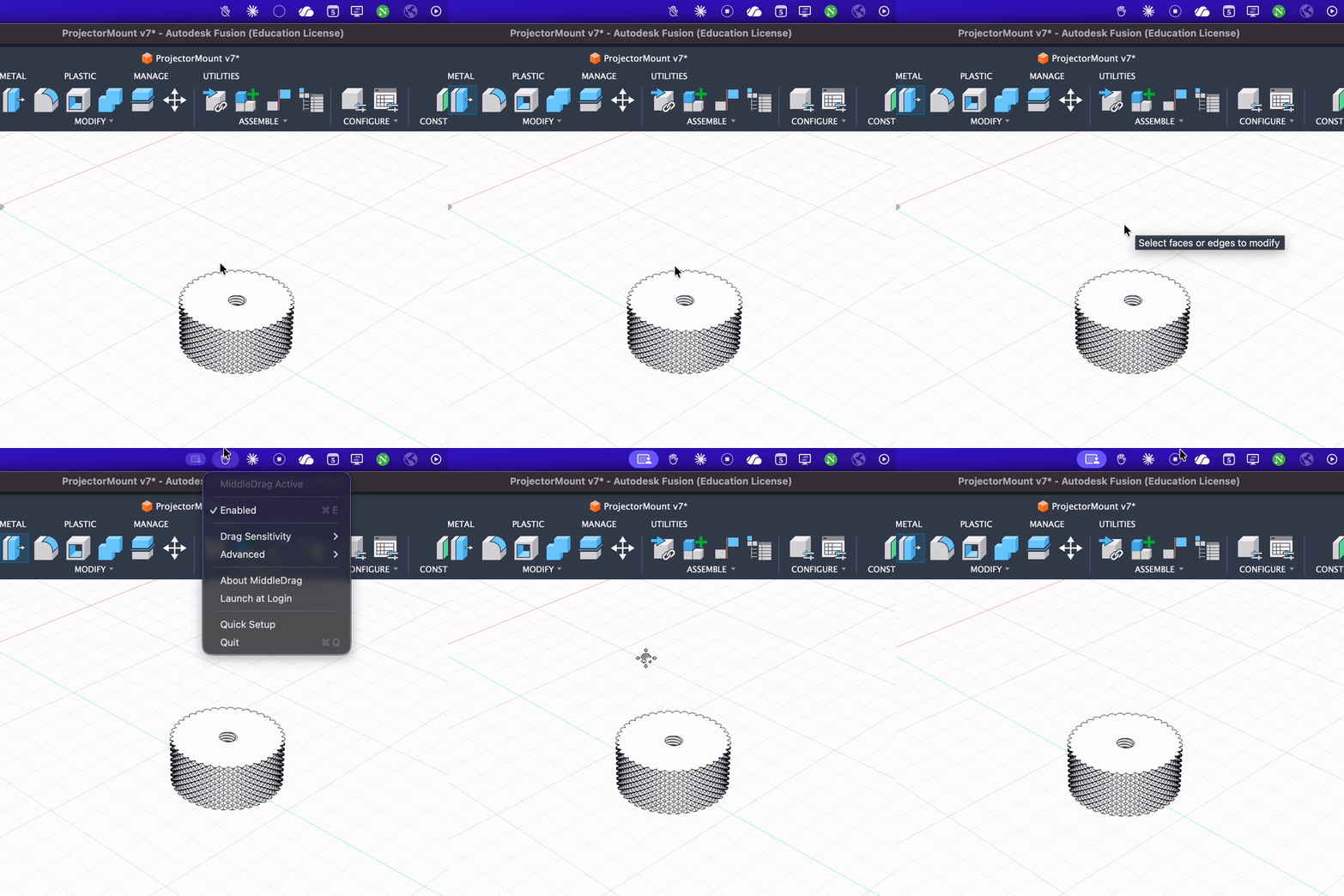
Mac trackpads don't have a middle mouse button. Many apps expect one.
MiddleDrag fixes this. Three-finger tap for middle-click. Three-finger drag for middle-drag. Works alongside Mission Control and other system gestures.
- Open links in new background tabs
- Close tabs with a click
- Open bookmarks/history in new tabs
- Pan canvas in Figma, Photoshop, Illustrator, GIMP
- Navigate large documents in PDF viewers
- Scroll in any direction without modifier keys
- Close editor tabs in VS Code, Sublime Text, IDEs
- Middle-click paste in terminals (where supported)
- Pan around large codebases in code visualization tools
- Orbit and pan viewports in Blender, FreeCAD, Fusion 360, SketchUp, Maya, ZBrush, OnShape
- Navigate Google Earth and mapping applications
- Essential for apps with broken or missing trackpad support
- Autoscroll in supported applications
- Any workflow that expects middle-mouse input
- Three-finger tap → Middle mouse click by default; configurable left/middle/right button
- Three-finger drag → Middle mouse drag by default; configurable left/middle/right button
- Tap to Drag → Optional three-finger tap followed by a three-finger hold/drag, with an independent button and configurable timeout
- Works with system gestures — Mission Control, Exposé, and other macOS gestures remain functional
- Native macOS app — Menu bar interface, no terminal configuration required
- Configurable — Adjust sensitivity and smoothing to your preference
- Launch at login — Set it and forget it
brew install --cask middledragsudo port install MiddleDrag- Download the latest
.pkginstaller from Releases - Open the installer and follow the prompts
- Launch MiddleDrag from your Applications folder
- Grant Accessibility permissions when prompted
Downloads are cryptographically attested via GitHub Artifact Attestations.
# Requires GitHub CLI: brew install gh
gh attestation verify ~/Downloads/MiddleDrag-{VERSION}.pkg --repo NullPointerDepressiveDisorder/MiddleDragMiddleDrag runs in your menu bar as a hand icon.
| Gesture | Action |
|---|---|
| Three-finger tap | Middle click |
| Three-finger drag | Middle drag (pan/orbit) |
| Three-finger tap, then three-finger hold/drag | Disabled by default |
To combine middle clicks with left dragging in user space, configure the menu:
- Tap to Click → Enabled, Middle Button.
- Direct Drag → Enabled, Left Button.
- Tap to Drag → Enabled, Middle Button. Its timeout defaults to 200 ms; choose a preset or Custom… to change it.
Tap to Drag requires lifting after the first tap, then putting three fingers down again within the timeout. On the second contact, significant movement starts dragging immediately. A stationary contact becomes a hold at the existing tap-duration limit (150 ms by default), allowing a long press without moving. The button is pressed at that point if it was not pressed early as described below. Lifting ends the hold or drag; existing cancellation and relift settings still apply.
Tap to Drag → Press Button on First Tap Release is on by default. When Tap to Click and Tap to Drag are both enabled and use the same button, lifting the first tap presses that button immediately. If no second contact arrives within the timeout, the button is released to complete the click. A following hold/drag keeps the button pressed until release. The cursor remains free between contacts.
When this option is off, or the two gestures use different buttons, ordinary tap clicks wait for the timeout and a following hold/drag consumes the first click. With either behavior, two short taps still produce two clicks, and the latest tap can arm the next hold/drag. Small accidental movements remain taps under the existing movement threshold. Tap to Click must be enabled for an early press; otherwise the first tap silently arms Tap to Drag as before.
All three gestures have independent enable switches and button choices. Tap to Drag also works with Tap to Click or Direct Drag disabled. Existing installations retain middle tapping and middle dragging with Tap to Drag off.
When enabled Direct Drag and Tap to Click use different buttons, physical three-finger left-button events are suppressed instead of immediately converted to the tap button. The recognizer then selects a tap or drag from the contact's movement and release. This prevents an incidental press from emitting a middle click just before a left drag. Physical-click conversion retains its legacy behavior when direct dragging is disabled or both buttons match.
This mode generates mouse events in MiddleDrag and suppresses competing scrolling. Use it with macOS Accessibility three-finger dragging disabled; leave Advanced → Window Bar Drag off to have MiddleDrag handle title bars too.
MiddleDrag intercepts horizontal and vertical scroll events while its gesture flags are active, including direct drag and tap-to-drag. It also uses the existing 150 ms release cooldown. Ordinary scrolling outside that interval and gestures passed through by Window Bar Drag are allowed.
Gesture Diagnostics records scroll.event with decision=passed or decision=suppressed, both axis deltas, and scroll/momentum phases.
Events arriving before gesture recognition are not buffered, and momentum is not tracked beyond the release cooldown. Suppression applies to scroll events from any device during the handled gesture; raw touch callbacks remain unchanged.
- Enabled — Toggle gesture recognition
- Tap to Click / Direct Drag / Tap to Drag — Independent enable switches and left/middle/right button choices
- Tap to Drag → Timeout — Release-to-next-contact interval, with presets and custom milliseconds
- Tap to Drag → Press Button on First Tap Release — Default-on early press when tap-click and tap-to-drag buttons match
- Drag Sensitivity — Cursor speed during drag (0.5x – 2x)
- Require Exactly 3 Fingers — Ignore 4+ finger touches
- Launch at Login — Auto-start with macOS
Use Advanced → Gesture Diagnostics → Start New Recording, then use your trackpad normally. After an unexpected click, choose Mark Unexpected Click, then Stop Recording and Save Event Log…. Starting a new recording clears the previous buffer; stopping preserves it for export. Recording is off at launch and retains the newest 30,000 records in memory, so mark and save soon after the glitch.
The local log records contact IDs, finger counts and touch states, normalized movement distances, tap/hold/release timer decisions, configured buttons, and requested/posted mouse-button edges. It also records external mouse-button events observed by MiddleDrag's event tap. It does not collect text, application/window names, or screen coordinates, and it is not uploaded through telemetry.
For a middle click before a direct drag, find user.unexpected_click and look backwards for click.down_posted. Its source identifies force_click (an external left click converted by the event tap) or recognized_tap (a recognizer tap). Match request to click.requested, then follow contact through touch.frame, contact.release_candidate, tap.recognized, tap.deferred, and drag.recognized. If the middle-button edge is button.edge_posted instead, look for button.pending_press and tap.early_press to identify a press on the first tap's release, or follow the preceding drag.recognized mode for a drag/hold press. A request without click.down_posted may have been skipped; event_tap.received with own=false identifies an event not tagged by MiddleDrag, but does not by itself identify which device or utility generated it.
Existing operational logs are also available in macOS Console (filter for the MiddleDrag process), or with:
log stream --style compact --level debug --predicate 'process == "MiddleDrag"'Those logs are less detailed, and debug messages are excluded from release builds. The local gesture recorder works in both debug and release builds.
BetterTouchTool is powerful but overwhelming. Hundreds of options, complex interface, middle-click buried among features you'll never use. MiddleDrag does one thing well.
Middle costs $8 for functionality that should be free. It's also closed-source. MiddleDrag is MIT-licensed and community-maintained.
MiddleClick requires terminal commands for all configuration — no GUI. MiddleDrag provides a native macOS settings interface. Both are open source, but MiddleDrag is actively maintained for modern macOS versions.
- macOS 15.0 (Sequoia) or later
- Built-in trackpad or Magic Trackpad
- Accessibility permissions
MiddleDrag uses Apple's private MultitouchSupport framework to intercept raw touch data before the system gesture recognizer processes it. This allows three-finger gestures to generate middle-mouse events while leaving Mission Control and other system gestures intact.
Technical flow:
- MultitouchSupport framework provides raw touch coordinates
- GestureRecognizer detects three-finger tap/drag patterns
- Accessibility API generates synthetic middle-mouse events
- CGEventTap suppresses conflicting system click events
git clone https://github.com/NullPointerDepressiveDisorder/MiddleDrag.git
cd MiddleDrag
./build.sh
Or open MiddleDrag.xcodeproj in Xcode 16+.
Project Structure
MiddleDrag/
├── Core/
│   ├── GestureRecognizer.swift    # Gesture detection logic
│   ├── MouseEventGenerator.swift  # Mouse event synthesis
│   └── MultitouchFramework.swift  # Private API bindings
├── Managers/
│   ├── DeviceMonitor.swift        # Trackpad monitoring
│   └── MultitouchManager.swift    # Main coordinator
├── Models/
│   ├── GestureModels.swift        # Configuration types
│   └── TouchModels.swift          # Touch data structures
├── UI/
│   ├── AlertHelper.swift          # Dialog utilities
│   └── MenuBarController.swift    # Menu bar interface
└── Utilities/
    ├── LaunchAtLoginManager.swift # Login item management
    └── PreferencesManager.swift   # Settings persistence
| macOS Version | Status |
|---|---|
| macOS 15 (Sequoia) | ✅ Supported |
| macOS 26 beta (Tahoe) | ✅ Compatible |
Works with built-in MacBook trackpads and external Magic Trackpads.
Gestures not working
- Check Accessibility permissions: System Settings → Privacy & Security → Accessibility
- Toggle "Enabled" in the menu bar
- Restart the app
After updating, gestures stopped
macOS treats each app version as a new application. Re-grant permissions:
- System Settings → Privacy & Security → Accessibility
- Toggle MiddleDrag off then on
- Restart MiddleDrag
Conflicts with system gestures
Use soft taps instead of physical clicks. The app is designed to coexist with system gestures, but pressing down hard may still trigger Mission Control.
Contributions welcome. See CONTRIBUTING.md.
MiddleDrag uses Sentry for crash reporting and Sparkle for auto-updates. See THIRD_PARTY_LICENSES for full license texts.
MiddleDrag™ is used as a trademark by Karan Kunal Mohindroo. The MIT License grants rights to the code, not the name. You may use the name "MiddleDrag" for:
- Forks intended for contribution back to this project
- Describing compatibility (e.g., "works with MiddleDrag")
- Factual references and reviews
If you distribute a modified version as a separate project, we ask that you choose a different name to avoid user confusion.

The middle mouse button your Mac trackpad is missing.